Staffing Rapid Time Page
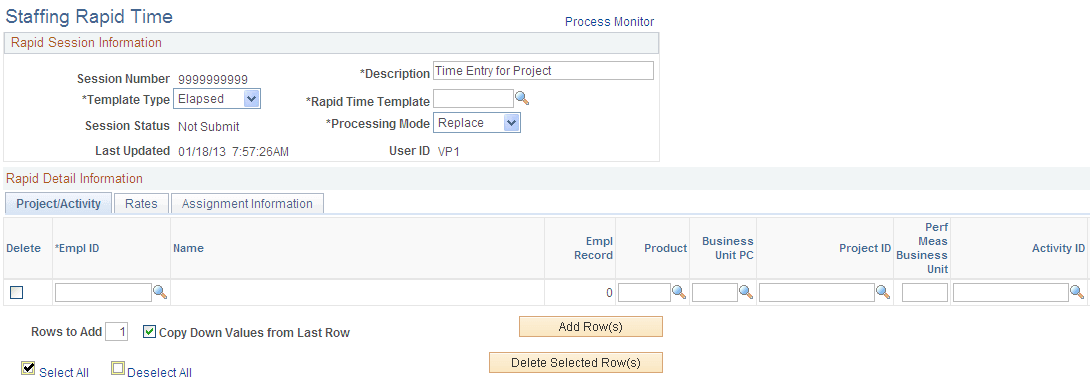
Use the Staffing Rapid Time page to enter elapsed time.
Navigation:
Access the HCM database. Then click
This example illustrates the fields and controls on the Staffing Rapid Time page 1 of 2 (elapsed time). You can find definitions for the fields and controls later on this page.
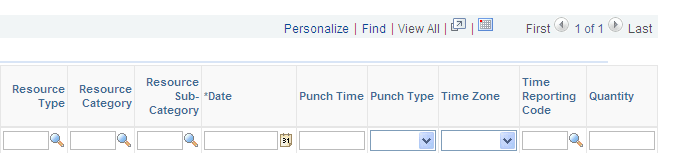
This example illustrates the fields and controls on the Staffing Rapid Time page 2 of 2 (elapsed time). You can find definitions for the fields and controls later on this page.
Project/Activity
Many of the fields on this page are the same as those on the Report Rapid Time page for punch time.
| Field or Control | Description |
|---|---|
|
TRC (time reporting code) |
Select a time reporting code. This field displays if it was selected on the rapid time template. |
|
Quantity |
Enter the number of hours, units, or an amount for reporting time. |
Rates
| Field or Control | Description |
|---|---|
|
Billable Indicator |
Select Yes to send this time reporter's billable time to the Billing application. |
|
Override Rate |
This rate is passed to the payroll system for use in pay calculations. It is critical for sending the correct pay rates to payroll and is a required field for PeopleSoft Pay/Bill Management users. Note: PeopleSoft Pay/Bill Management automatically populates this field by performing lookups in the assignment rates table. Also note that to meet FLSA requirements, the system populates overtime pay rates with regular time rates and relies on the payroll earnings code multipliers for the FLSA premium pay to be calculated. |
|
Bill Rate |
The rate the customer will be billed as specified on the assignment. |
Note:
If you report the business unit, department, customer, PeopleSoft PC business unit, project, activity, resource type, resource category, or resource subcategory in a Rapid Entry session for an employee, you must have previously defined these task elements on the employee's associated task template to avoid task exceptions during the validation of time.
Note:
PeopleSoft Pay/Bill Management automatically populates the HR Business Unit and Department fields on the Rapid Time record by doing lookups in the assignment cross reference and job tables. This information is particularly important if you want to use the Project Costing cost-revenue sharing functionality. (PeopleSoft Pay/Bill Management assumes that the GL department against which the labor costs are posted is of the same value as the HR department for which the employee works.)
Assignment Information
All fields are optional and only appear if they were selected on the rapid time template.
| Field or Control | Description |
|---|---|
|
HR Department |
Enter the department code. |
|
Customer |
The system displays the customer associated with the project (order). |