Creating G-Invoicing 7600EZ Reversal Vouchers
G-Invoicing reversal vouchers are entered to account for the following scenarios:
-
The seller sends a 324 Reversed transaction to reverse their original invoice (011).
-
The buyer wants to reject the seller's invoice (011) which can occur within or outside the number of rejection days designated for the G-Invoicing Business Application Type. This will create a 598 Rejected transaction and send to G-Invoicing using 7600EZ push API.
Following are the steps for each of these business processes.
Seller 324 Reversed Transaction
-
The seller creates Invoice (011) in G-invoicing.
-
The buyer runs 7600EZ pull for Invoice (011) transaction and subsequently enters a Regular Voucher and reference the Invoice EZ number.
-
The seller determines they want to reverse the transaction and process a G-Invoicing Reversed (324) transaction that will be settled in IPAC.
-
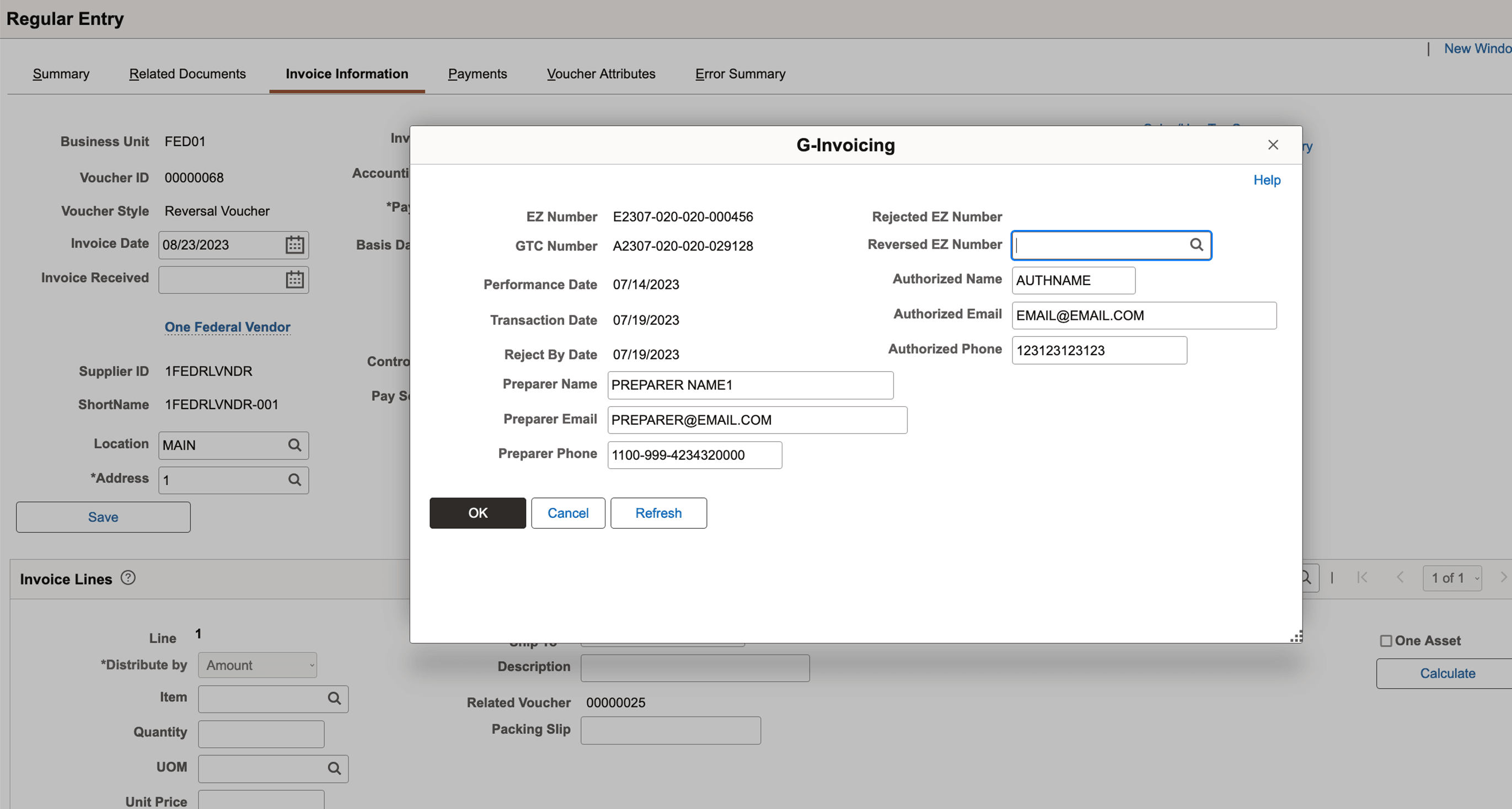
The buyer creates Reversal Voucher to account for the Reversed (324) transaction and populates the Reversed EZ Number. The reversal voucher will be fully processed.
This example illustrates the fields and controls on the Reversal Vouchers G-Invoicing page.
Buyer Invoice Rejection 598 within Business Application Type Rejection Days
-
The seller creates Invoice (011) in G-invoicing.
-
The buyer runs 7600EZ pull for Invoice (011) transaction and subsequently enters a Regular Voucher and reference the Invoice EZ number.
-
The buyer creates Reversal Voucher to reject the invoice with a date that is inside the number of rejection days. The reversal voucher can be fully processed to reflect so the payment is reversed. This will initiate the 598 Rejection transaction that is pushed using 7600EZ API to G-Invoicing. This will be reflected in the G-Invoicing system with a Settled (STL) status and funds returned by IPAC.
-
Note that G-Invoicing generates the EZ numbering for transactions that are pushed to the system. When the 7600EZ pull process is run again, the generated EZ number will be retrieved and populated for the 598 transaction.
Buyer Invoice Rejection 598 outside Business Application Type Rejection Days
-
The seller creates Invoice (011) in G-invoicing.
-
The buyer runs 7600EZ pull for Invoice (011) transaction and subsequently enters a Regular Voucher and reference the Invoice EZ number.
-
The buyer creates Reversal Voucher to reject the invoice with a date that is outside the number of rejection days. Since this is outside the number of days, the Reversal Voucher is put on hold and will initiate the 598 Rejection that is pushed using 7600EZ API to G-Invoicing. This will be reflected in the G-Invoicing system with an Informational (INF) status. INF transactions are not settled by IPAC.
-
Note that G-Invoicing generates the EZ numbering for transactions that are pushed to the system. When the 7600EZ pull process is run again, the generated EZ number will be retrieved and populated for the 598 transaction.
-
The seller will need to determine whether they take action in G-Invoicing and enter a Reversed (324) transaction. If they send the 324 transaction, the Reversal Voucher needs to be updated with the Reversed EZ Number and document taken off hold and fully processed.
-
If the seller does not agree to reverse the original voucher, the buyer can delete the Reversal Voucher.