Pay Cycle Processing Using the PeopleSoft Financial Gateway
This section discusses:
-
Pay Cycle processing through PeopleSoft Financial Gateway.
-
Payment cancellation.
-
Payments in error.
Pay Cycle Processing Through PeopleSoft Financial Gateway
You can submit approved payments electronically through the PeopleSoft Financial Gateway, using Pay Cycle Manager. The PeopleSoft Financial Gateway can be considered a web service agent or service oriented architecture (SOA). It provides certain PeopleSoft financial applications with payment processing capabilities, such as formatting payments, message acknowledgement, security features, and direct communication to financial institutions.
The Pay Cycle Manager settles only payments of EFT, ACH, and WIR payment methods through PeopleSoft Financial Gateway.
For wires, how you settle wires causes different results. When the system settles wires through Pay Cycle Manager, it results in the Pay Cycle process producing just an advice. If the system settles wires through PeopleSoft Financial Gateway, the system uses the defined form ID and layout for the electronic settlement. In addition, the system changes the wire label from wire report to wire because it is no longer simply producing a hard-copy report.
Note:
You control whether an approved payment is processed through the PeopleSoft Financial Gateway by selecting a check box on the External Accounts - Payment Methods page. If you do not want a payment settled through PeopleSoft Financial Gateway, you should deselect this check box prior to scheduling payments on the voucher.
Certain PeopleSoft Payables processes help create the PeopleSoft Financial Gateway specific payments:
-
During the Pay Cycle payment selection and creation processes, the system flags all payments marked for Financial Gateway settlement. This process also:
-
Groups payments based on certain criteria, which includes layout code and settle through field information.
-
Validates that the correct payment layout code is used if the bank replacement functionality is used.
-
-
During the Voucher Build Application Engine process (AP_VCHRBLD), the system validates the correct layout code.
-
If the layout code is undefined on the Supplier Pay table (VENDOR_PAY), the process retrieves the default value from the Bank Payment Layout table (BANK_PYMNT_LYT).
-
If the layout code is defined on the Supplier Pay table, the process validates this value against values stored in the Bank Payment Layout table and ensures that the layout can be settled by PeopleSoft Financial Gateway.
-
After payment selection and creation, the system inserts these Financial Gateway specific payments into a new pay cycle process row in the pay cycle result grid (PYCYCL_STATRPT) in Pay Cycle Manager. Clicking the Process button causes the system to:
-
Invoke the Payables Financial Gateway Application Engine process (AP_FG_PROC), which creates payment messages. Payment messages hold both the general settlement information (such as bank, routing, supplier bank, and payment advice information) and payment information. In addition to exchanging messages with the PeopleSoft Financial Gateway, the Payables Financial Gateway process and the AP Payment online Application Class handle various background processing tasks for payments; for example, they populate temporary and staging tables with payment data and update payment statuses.
-
Assign a unique Financial Gateway payment ID number.
-
Based on the number defined in maximum transactions per message in the Financial Gateway Installation table (INSTALLATION_FG), the system limits the number of payments held in each payment message. Exceeding this limit triggers the creation of the next payment ID.
-
You set the payment ID on the Source Registration page in the PeopleSoft Financial Gateway functionality. The batch name is an identification number to represent all the payments for a pay cycle, consisting of a concatenated string of the pay cycle ID number and the pay cycle sequence number.
-
-
Load payments to PeopleSoft Financial Gateway tables for further processing and transmittal to the bank after PeopleSoft Financial Gateway receives the payment message from PeopleSoft Payables.
-
Send acknowledgement messages to PeopleSoft Payables indicating whether the payment dispatch process is successful.
-
If successful, PeopleSoft Payables updates the payments' status to Loaded. When requested by the PeopleSoft Financial Gateway, the status is then updated.
-
If unsuccessful, PeopleSoft Financial Gateway sends error messages to PeopleSoft Payables. PeopleSoft Payables consolidates the messages before sending error notification to the user through email (you enable the error notification function by entering a user ID on the Payment Selection Criteria page).
-
-
Schedule and transmit the payments to the bank, sending asynchronous acknowledgement messages back to PeopleSoft Payables containing payment information. PeopleSoft Payables uses this information to update the payments' status to Paid, Error, or other statuses. During this part of the process, the Financial Gateway payment information appears on various PeopleSoft Financial Gateway and PeopleSoft Payables inquiry pages.
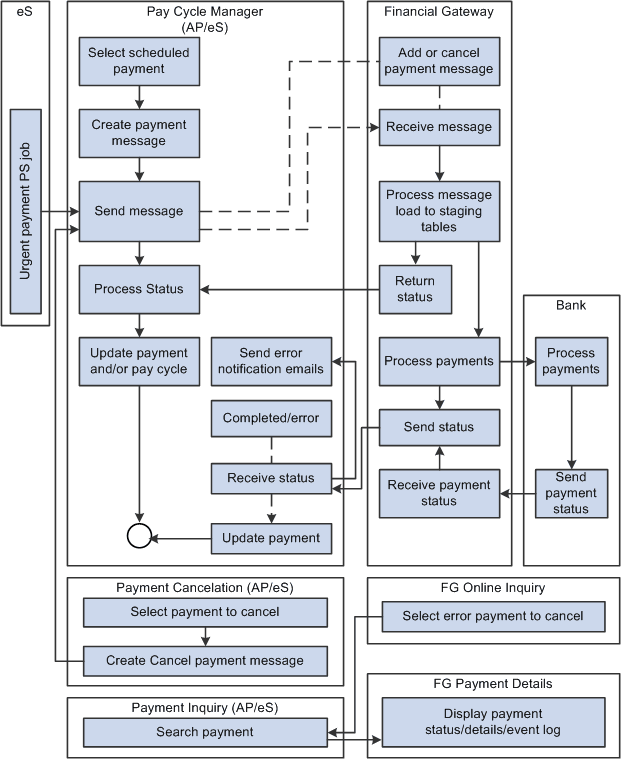
This diagram shows the integrations between PeopleSoft Payables and PeopleSoft Financial Gateway.
Note:
If the Financial Gateway Application Engine process ends abnormally during processing, you can restart the process using the Process Monitor in the Process Scheduler. The process begins again from where it ended.
When the payment processing is complete, you can use the following pages to review information:
PeopleSoft Payables pages:
-
Pay Cycle Details (PYCYCL_DATA_INQ).
-
Pay Cycle Approval (PYCYCL_APPROVAL).
-
Payment Inquiry (PYMNT_INQ_SRCH).
PeopleSoft Financial Gateway pages:
-
Review Payments (PMT_INQUIRY).
-
Review Payment Details (PMT_LIFE_CYCLE_INQ).
-
Review Payment Files (PMT_FILE_DEFN).
-
Review Acknowledgement Files (PMT_FILE_ACK_DEFN).
Payment Cancellation
You can cancel payments that display a settlement status of Loaded, Hold, or Error. Canceling a Financial Gateway payment triggers the following system actions:
-
The system sends a cancel message to PeopleSoft Financial Gateway.
When you use the Mass Payment Cancellation component (AP_PMT_MASS_CNL) to cancel multiple payments, the system sends multiple cancel payments in a message to PeopleSoft Financial Gateway.
-
PeopleSoft Financial Gateway receives the message, and manages the cancel request depending on the settlement status.
-
Loaded: Payments with a loaded status may be on the staging table and pending transmission to the bank, or they may be in active transmission to the bank.
If the payment is still pending transmission, PeopleSoft Financial Gateway removes the payment from the staging tables and sends an acknowledgement message back to PeopleSoft Payables. PeopleSoft Payables then updates the payment's status to Canceled.
If the payment is in active transmission, PeopleSoft Financial Gateway prohibits the cancellation and sends an error message to PeopleSoft Payables. For these situations, you must wait for PeopleSoft Payables to display a payment status of Paid, and then cancel the payment.
-
Hold: For held payments, PeopleSoft Financial Gateway removes the payment from the staging tables and sends an acknowledgement message to PeopleSoft Payables. PeopleSoft Payables then updates the payment's status to Canceled.
-
Error: PeopleSoft Financial Gateway holds payments on the staging tables due to errors encountered during PeopleSoft Financial Gateway or bank processing. To cancel payments in error, PeopleSoft Financial Gateway updates the staging and update error tables and sends an acknowledgement message to PeopleSoft Payables. PeopleSoft Payables then updates the payment's status to Canceled.
When you cancel multiple payments, use the Mass Cancellation Job page to view errors encountered through the PeopleSoft Financial Gateway.
-
In some cases, payment statuses may be out of synchronicity between PeopleSoft Payables and PeopleSoft Financial Gateway. When a payment has a Canceled status in PeopleSoft Payables, no messages are transmitted between PeopleSoft Payables and PeopleSoft Financial Gateway. "Out of sync" payment statuses generally occur when users reverse and save a canceled payment. At Save, the system displays a warning message stating that saving the reverse canceled payment may disrupt the synchronization between the two systems.
Payments in Error
During processing through the PeopleSoft Financial Gateway functionality, the system marks payments that have processing errors, and sends individual or batch messages to PeopleSoft Payables that the payments cannot be settled. The system then sends payment error notification emails to specified user IDs if you define the required notification parameters, such as user's email address in user preference and user ID in the payment selection criteria. This payment error notification email contains payment error summary information and a link to the Pay Cycle Error page for error correction.
As error payments can be related to different pay cycles, the system first determines if the payment requires email notification, then bundles those errors requiring notification together into a single email.
See Setting Up the PeopleSoft Financial Gateway Integration.
Related Topics
- Understanding Pay Cycle Processing
- Understanding PeopleSoft Payables Payment Formats
- Understanding the PeopleSoft Payables Payment Interface
- Understanding Additional Payment Processing Options
- Understanding Prepayment Processing
- Understanding Draft Processing
- Understanding Federal Payment Processing