Payment Request
PeopleSoft Payables provides users with a feature to enter payment requests such as non-PO, miscellaneous and other expenses into PeopleSoft. Payment Request empowers the users to submit their own expenses, which results in alleviating the workload in Payables by limiting it to review, correct, and audit the transactions. This self-service feature enables users to create payment requests outside of the purchasing system and without having to know Payables.
Click to watch a short video about PeopleSoft Payment Request
Configuration Options and Requirements for Payment Request
A configuration template enables users to configure fields or functionality on the payment request pages. The Payment Request template is located on a separate tab on the Payables Product Related component.
Payment Request Approval Workflow and Review Submittal
The payment request has the following methods of approval and workflow processes:
-
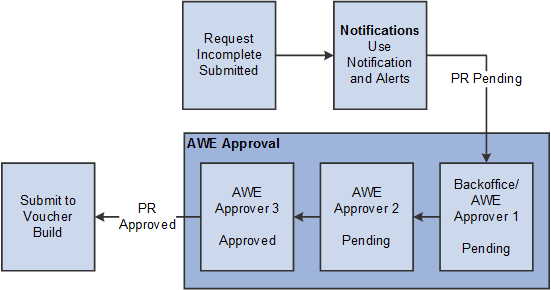
Workflow Approval: Users can enable the workflow framework to approve the Payment Request. The approver having Reviewer permissions will have access to the Payment Request pages to make necessary changes to the request and then to return to approval framework for approving it. Diagram 1 illustrates the AWE Workflow Approval.
-
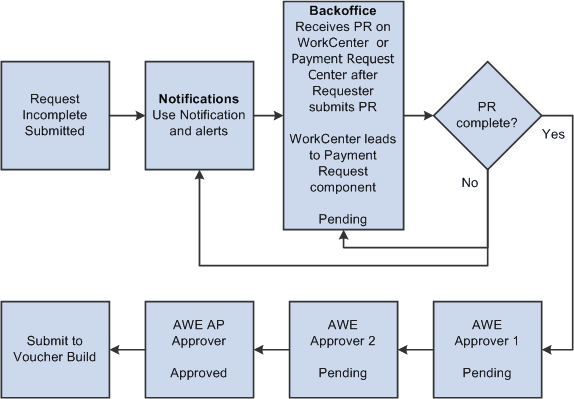
Review before Workflow Approval: Users can enable to initiate a review/edit process for reviewers before the Payment Request goes to workflow approval for approval. Diagram 2 illustrates Review before Workflow Approval.
-
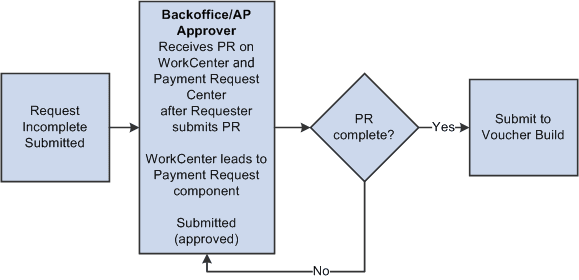
AP Review - No Workflow Engine: Enable a review/edit process for users with Reviewer Role permissions before the Payment Request goes to Voucher Build process. Diagram 3 illustrates the process with no workflow approval implementation.
This diagram illustrates the concept of AWE Workflow - AP as Final Approver:
Note:
One of the AWE Approvers can be designated as the Backoffice user.
This diagram illustrates the concept of AWE Workflow - Back Office Separate from Final Approver:
This diagram illustrates the concept of No AWE - Back Office same as Final Approver:
Payment Request Center
Payment Request Center is a centralized page where users can see all their payment requests, filter payment requests, add, edit, cancel, and view payment requests, along with answering questions.
The Payment Request occurs through a “train stop” comprising of four pages, from creating a request to submitting it:
-
Payment Summary Information.
-
Supplier Information.
-
Line Details.
-
Review and Submit.
Users create Payment Requests by accessing the pages and completing the request using a train stop progression. When a user initiates a Payment Request, it is assigned an auto-generated Payment Request ID number. Payment request ID uses auto numbering to assign the next available ID when a new Payment Request gets created.