Configuring Forecasts
To configure forecasts, use the Forecast Configuration component (BUS_UNIT_OPT_FC).
Before using the forecast collection tool, you must define certain settings at the general ledger (GL) business unit level. These settings are keyed by SetID so that they can be shared by multiple business units.
Note:
This topic is required. You must configure forecast time periods before you can use the Services Forecasting feature.
Page Used to Configure Forecasts
| Page Name | Definition Name | Usage |
|---|---|---|
|
BUS_UNIT_OPT_FC |
Define forecast collection options at the SetID level. |
Forecast Configuration Page
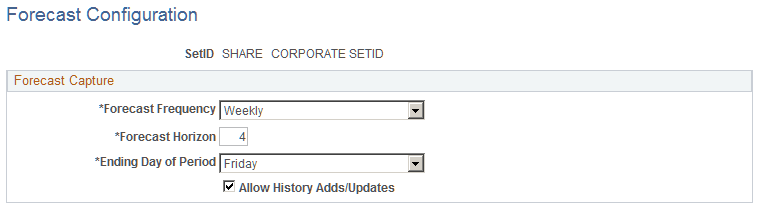
Use the Forecast Configuration page (BUS_UNIT_OPT_FC) to define forecast collection options at the SetID level.
Navigation:
This example illustrates the fields and controls on the Forecast Configuration page. You can find definitions for the fields and controls later on this page.
| Field or Control | Description |
|---|---|
|
Forecast Frequency |
Select how frequently you want to estimate and collect forecasts. Options are: Weekly, Biweekly, Semimonthly, Monthly, and Quarterly. The selection determines how frequently forecasts are updated and controls how the horizon periods appear on the Forecast Time - Summary page and Forecast Time - Forecast by Period page. |
| Field or Control | Description |
|---|---|
|
Forecast Horizon |
Enter the number of horizon periods to include in each forecast horizon. This determines the number of periods for which the resource must report a detailed forecast in each forecast time collection iteration. The maximum number of horizon periods is 13. |
| Field or Control | Description |
|---|---|
|
Ending Day of Period |
For weekly or biweekly forecast frequencies, specify the day of the week that the horizon period ends so that the system knows when to begin the next horizon period. This field is required only for weekly or biweekly forecast frequencies and is not used for all other forecast frequencies. Note: If PeopleSoft Expenses is installed, the Forecast Frequency and Ending Day of Period settings should match the time reporting options in PeopleSoft Expenses. For example, if expense periods end on Saturday, horizon periods should also end on Saturday. This enables users to report actual time and forecast time on the same schedule, which makes it easier to compare and analyze the information. |
| Field or Control | Description |
|---|---|
|
Allow History Adds/Updates |
Select to enable resources or their supervisors to create and submit forecasts for past forecast iterations, and to enable resources to change or submit a pending forecast that was never submitted. Note: Even if you allow history adds and updates, you cannot modify submitted forecasts from prior forecast iterations. The purpose of history adds and updates is primarily to enable users to submit prior forecasts if they forgot to submit one or want to correct one that is not yet submitted. |