Reviewing Program, Project, and Activity Risks
Page Used to Review Program, Project, and Activity Risks
| Page Name | Definition Name | Usage |
|---|---|---|
|
PGM_RISKS_LIST |
Search for project risks by using a configurable search page. |
Review Risks Page
Use the Review Risks page (PGM_RISKS_LIST) to view for project and activity risks .
Navigation:
This example illustrates the fields and controls on the Review Risks page. You can find definitions for the fields and controls later on this page.
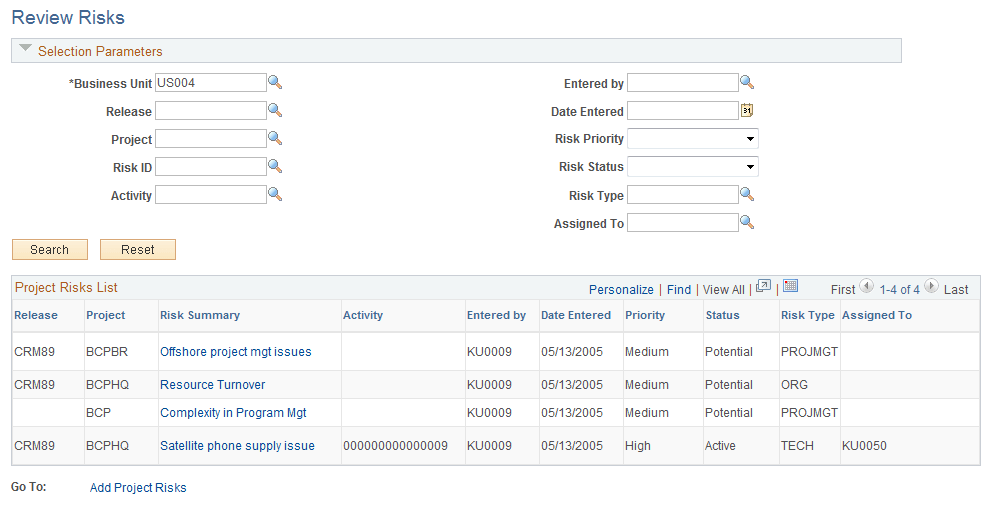
In the Selection Parameters group box, specify the search options to filter your search results to the risks that you want to view.
| Field or Control | Description |
|---|---|
|
Business Unit |
Enter a business unit. The business unit default value is based on user preferences. |
|
Search |
Click to display all projects risks that satisfy the search criteria in the Project Risks List group box. To iteratively narrow your search results, enter additional search criteria and click the Search button again. |
|
Reset |
Click to clear all optional fields in the Selection Parameters group box, and to clear the search results in the Project Risks List group box. |
|
Risk Summary |
Click the Risk Summary link to access the Project Risk page, on which you can view and edit data for the selected risk. |
|
Add Project Risks |
Click to access the Project Risk page to create a new program, project, or activity risk. |