PeopleSoft Project Costing and Microsoft Project Integration
Integrating PeopleSoft Project Costing and Microsoft Project combines the PeopleSoft Project Costing project accounting capabilities with the Microsoft Project planning and scheduling features. The integration enables the PeopleSoft Project Costing and PeopleSoft Program Management applications to incorporate scheduling information for use across the enterprise and enables project managers to update their individual Microsoft Project files with actual costs, resources, schedules, and so forth from the PeopleSoft Enterprise applications.
The Microsoft Project integration allows for the transmission of data from PeopleSoft software to Microsoft software and vice versa. When you integrate, you can export data from PeopleSoft Project Costing to a Microsoft Project file or import data from a Microsoft Project file into the PeopleSoft system. You can run the integration either direction at any time, depending on the needs of the business and the project management methodology.
By using the integration of PeopleSoft Project Costing and Microsoft Project, you can synchronize:
-
Projects.
-
Project teams.
-
Activities.
-
Duration and date calculations.
-
Percent-complete calculations.
-
Budgets.
-
Actual costs.
-
Dependencies and constraints.
Additionally, if PeopleSoft Program Management is installed, the integration enables you to create and maintain assignments for labor, material, and assets at both the project and activity levels by using the Program Management functionality of the Resources, Resource Detail, and Resources by Activity pages.
The PeopleSoft Project Costing and Microsoft Project integration allows for the creation of projects in either application. The integration also allows for the transfer of tasks (in Microsoft Project) or activities (in PeopleSoft Project Costing) and their associated resource assignments. Microsoft Project's user-definable field objects store specific PeopleSoft Project Costing fields such as business unit and project ID. Microsoft Project also stores the PeopleSoft Project Costing project and activity definition, description, status, manager, percent complete for the activity, budgets, dates, and duration.
Data Flow
Four ways are available to integrate project data between PeopleSoft software and Microsoft software:
| Integration Procedure | Flow of Data |
|---|---|
|
Create a project in Microsoft software from an existing PeopleSoft project. |
Export from PeopleSoft software to Microsoft software. |
|
Update a Microsoft Project with data from PeopleSoft software. |
Export from PeopleSoft software to Microsoft software. |
|
Update a PeopleSoft project with data from Microsoft software. |
Import from Microsoft software to PeopleSoft software. |
|
Create a project in PeopleSoft software from an existing Microsoft project. |
Import from Microsoft software to PeopleSoft software. |
This diagram is a high-level view of the integration data flow:
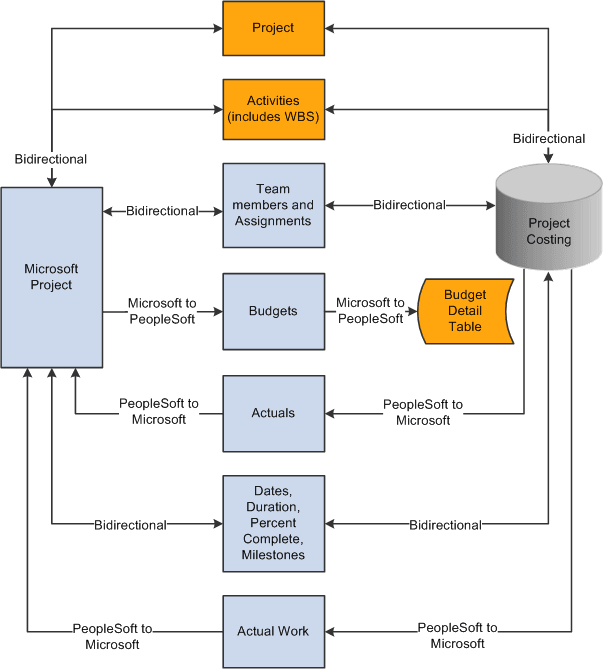
This table lists the types of data that are exchanged and the direction of the data flow:
| Data Type | Direction |
|---|---|
|
Project data. |
Bidirectional. |
|
Project team (resources). |
Bidirectional if PeopleSoft Program Management is not installed. |
|
Activity or task. |
Bidirectional. |
|
Team or task assignments. |
Bidirectional if PeopleSoft Program Management is installed. |
|
Job codes. |
PeopleSoft to Microsoft from project team if PeopleSoft Program Management is not installed. |
|
Cost and bill rates. |
Bidirectional if you use override rates. |
|
Budget items. |
Bidirectional. |
|
Actual costs. |
PeopleSoft to Microsoft. |
|
Budget costs. |
Microsoft to PeopleSoft. |
|
Work. |
PeopleSoft to Microsoft. |
|
Dates. |
Bidirectional. |
|
Percent complete (activity level). |
Bidirectional. |
|
Percent complete (project level if calculation method is manual). |
Microsoft to PeopleSoft. |
|
Duration. |
Bidirectional. |
|
Milestones. |
Bidirectional. |
Terminology
This table describes terms that are relevant to the integration between PeopleSoft Project Costing and Microsoft Project:
| Term | Description |
|---|---|
|
Activity |
A project component that the system uses to capture charges that relate to that aspect of the project, and a representation of the work that is required to complete part of a project. In Microsoft Project, activities are called tasks. |
|
Actual Work |
Tracks the actual number of hours spent by a labor resource on an activity. PeopleSoft Project Costing sends actual work information to Microsoft Project from rows in the Project Transaction table that have a system source of BEX, which identifies rows that came from PeopleSoft Expenses. The Expenses to Project Costing Application Engine process (PC_EX_TO_PC) updates actual work in PeopleSoft Project Costing. Actual work is not updated from Microsoft Project to PeopleSoft Project Costing. |
|
Resources |
People, equipment, and material that are required for completing the project and the activities that are on the project. Resources can have rates associated with them for the purposes of deriving their estimated and actual costs to an activity and a project. |
|
Start Date |
A required field that represents the current start date of the project and activity. The start date can be entered in PeopleSoft software or Microsoft software. Given the duration and end date of a project or activity, the system can calculate the start date. |
|
End Date |
A required field that represents the current end date of the project and activity. The end date can be entered in PeopleSoft software or Microsoft software. The end date can be calculated if values are available for the duration and start dates. |
|
Baseline Start Date |
The planned beginning date of a project or activity. This field can be entered in PeopleSoft software or Microsoft software. |
|
Baseline Finish Date |
The planned completion date of a project or activity. This field can be entered in PeopleSoft software or Microsoft software. |
|
Actual Start Date |
The date on which the project or activity actually begins. It can be entered in PeopleSoft software or Microsoft software based on progress information that you enter. |
|
Actual Finish Date |
The date on which the project or activity actually finishes. |
|
Late Start Date |
Represents the latest date that an activity or task can start without delaying the finish of the project. This date is based on the task's start date, the late start and late finish dates of predecessor and successor tasks, and other constraints. |
|
Late Finish Date |
Represents the latest date that an activity or task can finish without delaying the finish of the project. This date is based on the task's late start date, the late start and late finish dates of predecessor and successor tasks, and other constraints. This field can be entered in PeopleSoft software or Microsoft software. |
|
Early Start Date |
Represents the earliest date that an activity or task can possibly begin, based on the early start dates of predecessor and successor tasks, and other constraints. This field can be entered in PeopleSoft software or Microsoft software. |
|
Early Finish Date |
Represents the earliest date that an activity or task can possibly finish, based on early finish dates of predecessor and successor tasks, other constraints, and any leveling delay. This field can be entered in PeopleSoft software or Microsoft software. |
|
Duration |
The total number of days that are needed to complete an activity from start date to end date. Duration is stored as hours and appears as days. Duration exists at both the project and activity level. Duration can be calculated if values are available for the project or activity start and end dates. |
|
Work |
The total number of hours spent or to be spent by a resource on an activity. Work does not equal duration. For example, the expected duration of an activity might be five days, but the work that is assigned to the activity might be 80 hours with two resources working on the activity. You define work in hours at the activity level. |
|
Remaining Work |
Remaining work, also known as estimate to complete (ETC), can be either automatically calculated or manually entered. When calculated, (ETC) = (work) − (actual work). |
Note:
The PeopleSoft Integration Architecture for Microsoft Project Integrations document that is available on Oracle's My Oracle Support website discusses how the PeopleSoft and Microsoft systems exchange data fields and the business logic behind the exchange.
PeopleSoft - Microsoft Project Integrator
When the integration process runs, the Microsoft Project file that is associated with the PeopleSoft project is transferred, through FTP, to a shared directory that is accessible by the Integrator server. The Integrator performs all reading and writing to the Microsoft Project file. When a user requests an integration, data is staged for the Integrator to start. The Integrator checks every 15 seconds for the staged data. If a user attempts an integration while the Integrator is engaged with a previous request, the new request is placed in a queue until an Integrator is available. You can set up more than one Integrator to enable multiple integrations to occur simultaneously.
An Integrator has several states:
-
Hold: Indicates that a previously available integrator has been taken offline.
-
Waiting: Indicates an idle state.
The Integrator is ready and waiting for staged data to appear to perform an integration.
-
Busy: Indicates that the Integrator is working on a previous integration request.
-
Error: Indicates that the last integration has a nonrecoverable error.
In this case, the Microsoft Project file or the PeopleSoft project is not updated. The messages that are generated by the error are stored with the project. The next time that the Integrator checks for data, the error information that appears at the bottom of the Maintain Project with Microsoft page is cleared and the Integrator continues on to the next integration request.
The state of the Integrator, warnings, and error messages appear in the Integration Session Log that you can view on the Create Project from Microsoft page.