Setting Up Project ChartFields
To set up project ChartFields, use these components:
-
Source Types (PROJ_RES_TYPE)
-
Categories (PROJ_CATG_DEFN)
-
Subcategories (PROJ_SUBCAT_DEFN)
-
Relate Source Type/Category (PROJ_TYPE_CAT)
-
Relate Category/Subcategory (PROJ_CAT_SUB)
Use these component interfaces to load data into the tables for this component:
-
PC_RES_TYPE_INTFC
-
PC_CATG_DEFN_INTFC
-
PC_SUBCAT_DEFN_INTFC
Pages Used to Set Up Project ChartFields
| Page Name | Definition Name | Usage |
|---|---|---|
|
PROJ_RES_DEFN |
Create and modify source types. |
|
|
Categories Page |
PROJ_CATG_DEFN |
Create and modify categories. |
|
Subcategories Page |
PROJ_SUBCAT_DEFN |
Create and modify subcategories. |
|
Relate Source Type/Category Page |
PROJ_TYPE_CAT |
Relate source types to categories. |
|
PROJ_CAT_SUB |
Relate categories to subcategories. |
Source Types Page
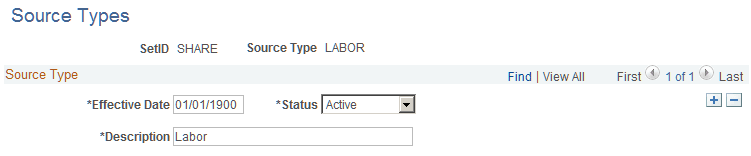
Use the Source Types page (PROJ_RES_DEFN) to associate source types to categories.
Navigation:
This example illustrates the fields and controls on the Source Types page.
| Field or Control | Description |
|---|---|
|
Category |
Enter a category to associate with the displayed source type. Available values are based on the Project Type Category Prompt table (PROJ_TYPE_CAT). Add more rows to add additional categories. |
|
Relationship |
Enter a description of the relationship for each type and category combination. |
Relate Category/Subcategory Page
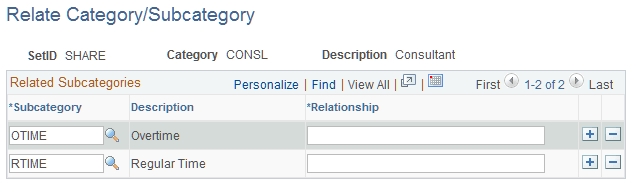
Use the Relate Category/Subcategory page (PROJ_CAT_SUB) to relate categories to subcategories.
Navigation:
This example illustrates the fields and controls on the Relate Category/Subcategory page. You can find definitions for the fields and controls later on this page.
| Field or Control | Description |
|---|---|
|
Subcategory |
Enter a subcategory to associate with the displayed category. Available values are based on the Project Subcategory Prompt table (PROJ_CAT_SUB). Add more rows to add additional subcategories. |
|
Relationship |
Enter a description for the new category and subcategory relationship. |