Setting Up Transaction-Related Information
To set up transaction-related information, use these components:
-
Analysis Types (PROJ_ANALYSIS_TYPE)
-
Analysis Groups (ANALYSIS_GRP_DEFN)
-
Resource Groups (PROJ_RES_GRP_DEFN)
-
Transaction Identifiers (PC_TRANS_IDENTIFY)
Pages Used to Set Up Transaction-Related Information
| Page Name | Definition Name | Usage |
|---|---|---|
|
PROJ_ANTYPE_DEFN |
Create and modify analysis types. |
|
|
PROJ_AN_GRP_MAP |
Create and modify analysis groups. |
|
|
Analysis Groups - Description Page |
PROJ_AN_GRP_DEFN |
Describe the purpose of the analysis group. |
|
PROJ_RT_GRP_MAP |
Create and modify source groups. |
|
|
Source Groups - Description Page |
PROJ_RT_GRP_DEFN |
Describe the source group. |
|
PC_TRANS_IDENTIFY |
Define transaction identifiers that consist of groups of project ChartField values. |
Analysis Types Page
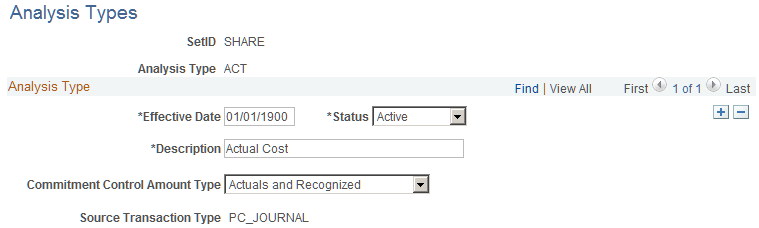
Use the Analysis Types page (PROJ_ANTYPE_DEFN) to create and modify analysis types.
Navigation:
This example illustrates the fields and controls on the Analysis Types page. You can find definitions for the fields and controls later on this page.
| Field or Control | Description |
|---|---|
|
Commitment Control Amount Type |
Select an amount type that tells Commitment Control how to process transactions. This field is directly related to the type of transaction that is coming into Commitment Control and identifies what type of transaction to process. This field appears only if the Commitment Control feature is activated. |
|
Source Transaction Type |
Displays the source transaction type defined in the Commitment Control feature, which maps Project Costing fields to Commitment Control fields. The two source transaction types are PC_JOURNAL and PC_BUDGET. This field appears if the Commitment Control feature is activated. |
See PeopleSoft Commitment Control: Understanding Source Transaction Type Setup.
Analysis Groups Page
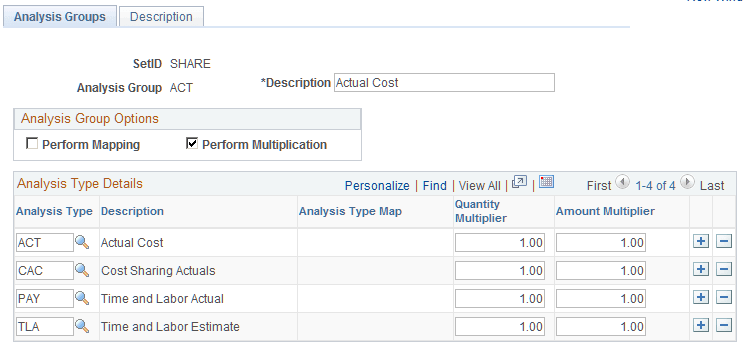
Use the Analysis Groups page (PROJ_AN_GRP_MAP) to create and modify analysis groups.
Navigation:
This example illustrates the fields and controls on the Analysis Groups page. You can find definitions for the fields and controls later on this page.
Note:
If your organization uses PeopleSoft Fluid User Interface pages to manage projects and you change an analysis group for cost, billing, or revenue on this page, you should run the Refresh Reporting Tables process (PC_SUM_PR) using the Refresh Reporting Tables Page.
| Field or Control | Description |
|---|---|
|
Perform Mapping |
Select to use the analysis group for mapping analysis types from a template to a new project or activity. |
|
Perform Multiplication |
Select to manipulate transaction quantities and amounts. Enter multipliers in the Quantity Multiplier and Amount Multiplier fields. |
|
Analysis Type |
Select the analysis types to include in the analysis group. |
|
Analysis Type Map |
Select the analysis type to which the analysis type in the first column will be converted in the newly created project or activity. These fields appear only if you select the Perform Mapping option. |
|
Quantity Multiplier and Amount Multiplier |
Enter a factor that the system uses to modify incoming quantity and amount values. Enter multipliers of zero to copy quantities and amounts into new projects as zero. |
Source Groups Page
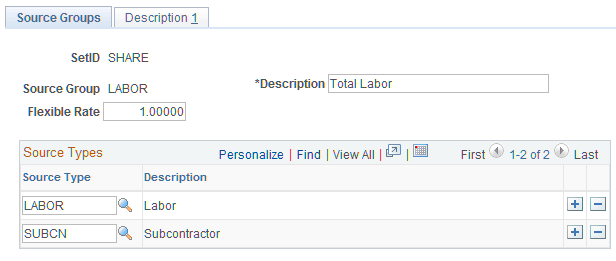
Use the Source Groups page (PROJ_RT_GRP_MAP) to create and modify source groups.
Navigation:
This example illustrates the fields and controls on the Source Groups page. You can find definitions for the fields and controls later on this page.
| Field or Control | Description |
|---|---|
|
Flexible Rate |
Enter a rate by which to multiply the source types in this source group to create a special project view. |
|
Source Types |
Select the source types to include in the source group. |
Transaction Identifiers Page
Use the Transaction Identifiers page (PC_TRANS_IDENTIFY) to define transaction identifiers that consist of groups of project ChartField values.
Navigation:
This example illustrates the fields and controls on the Transaction Identifiers page. You can find definitions for the fields and controls later on this page.
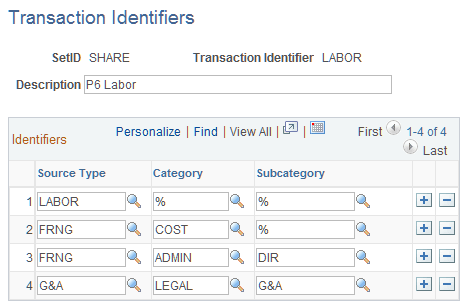
Enter source type, category, and subcategory rows that are valid combinations of project ChartField values. Use the wildcard value (a percent sign) in a field to indicate that any value for that field is valid in combination with the other field values in that row. Although the system prevents the creation of duplicate rows within a transaction identifier, an identical row can be part of other transaction identifiers.