Summarization Process Flow
This diagram shows the Project Data Compression process, which consists of six steps.
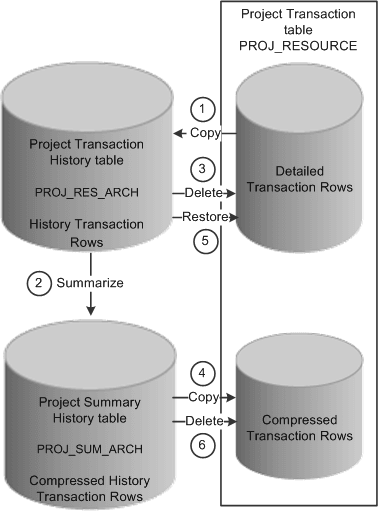
The data compression and restoration process flow that the system performs is:
-
Copy the detailed transaction rows based on the compression template and run control options from the Project Transaction table (PROJ_RESOURCE) to the Project Transaction History table (PROJ_RES_ARCH).
-
Summarize detailed transaction rows in the Project Transaction History table and copy them to the Project Summary History table (PROJ_SUM_ARCH).
-
Delete the original transactions from the Project Transaction table.
-
Copy summarized transactions in the Project Summary History table to the Project Transaction table.
-
Restore rows from the Project Transaction History table to the Project Transaction table as detailed rows.
-
Delete compressed rows in the Project Transaction table.
See the product documentation for PeopleTools: Data Management