Understanding Project Trees
PeopleSoft Tree Manager is a PeopleTools utility that is useful with many PeopleSoft applications, including Project Costing. Project trees define how projects are related to one another. The relationships between projects determine the level of detail achieved when tracking and reporting costs.
See PeopleTools: PeopleSoft Tree Manager
A project can be hierarchically related to as many projects as necessary to achieve the necessary degree of cost tracking and analysis. The project structure determines how costs are accumulated, tracked, and reported.
Create a project tree to track project costs in as much detail as is required. The more detailed your project tree is, the greater the detail at which you can track your costs. In the tree shown in the following diagram, you can track costs for the entire program or for each project:
Example of a program that has two projects, project A and project B. Project A has two activities, activity 1 and activity 2. Project B has one activity and one project, activity 3 and project C. Project C has one activity, activity 4. Transactions are created from the activities.
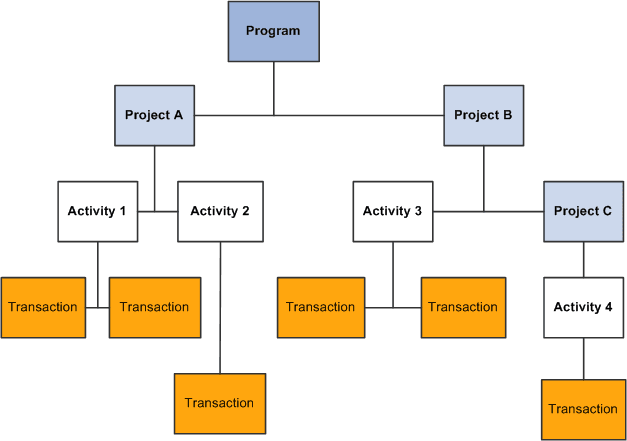
The costs for Project A include all costs from Activity 1 and Activity 2. The costs for Project B include all costs for Activity 3, as well as the cost for Project C (which includes Activity 4). Keep in mind that project trees are node-oriented—or winter trees—and do not display activities. You can, however, access the Project Definitions - General Information page by clicking the Edit Data icon for project trees in the Tree Manager page.
At the top of a project tree, you can create a single program into which all of the projects for the entire tree can be rolled up. This type of project is called a program or summary project. Programs are created by selecting the Program check box in the Project Definitions - General Information page. You cannot assign activities directly to a program. The allocation process, however, can spread costs, such as overhead, to these programs. All of the costs for a project tree, including activities assigned to all of its child projects, can be rolled up into the program.
Each project tree is keyed by business unit and effective date and has its own individual structure and security. Changes that you make to project trees are implemented throughout the Project Costing database.
Related Topics