Buyer WorkCenter Home Page
Use the Buyer WorkCenter Home page (PTPG_PGVIEWER) to manage requisitions, purchase orders, receipts, contracts, and related data.
Navigation:
This example illustrates the fields and controls on a configured Buyer WorkCenter.
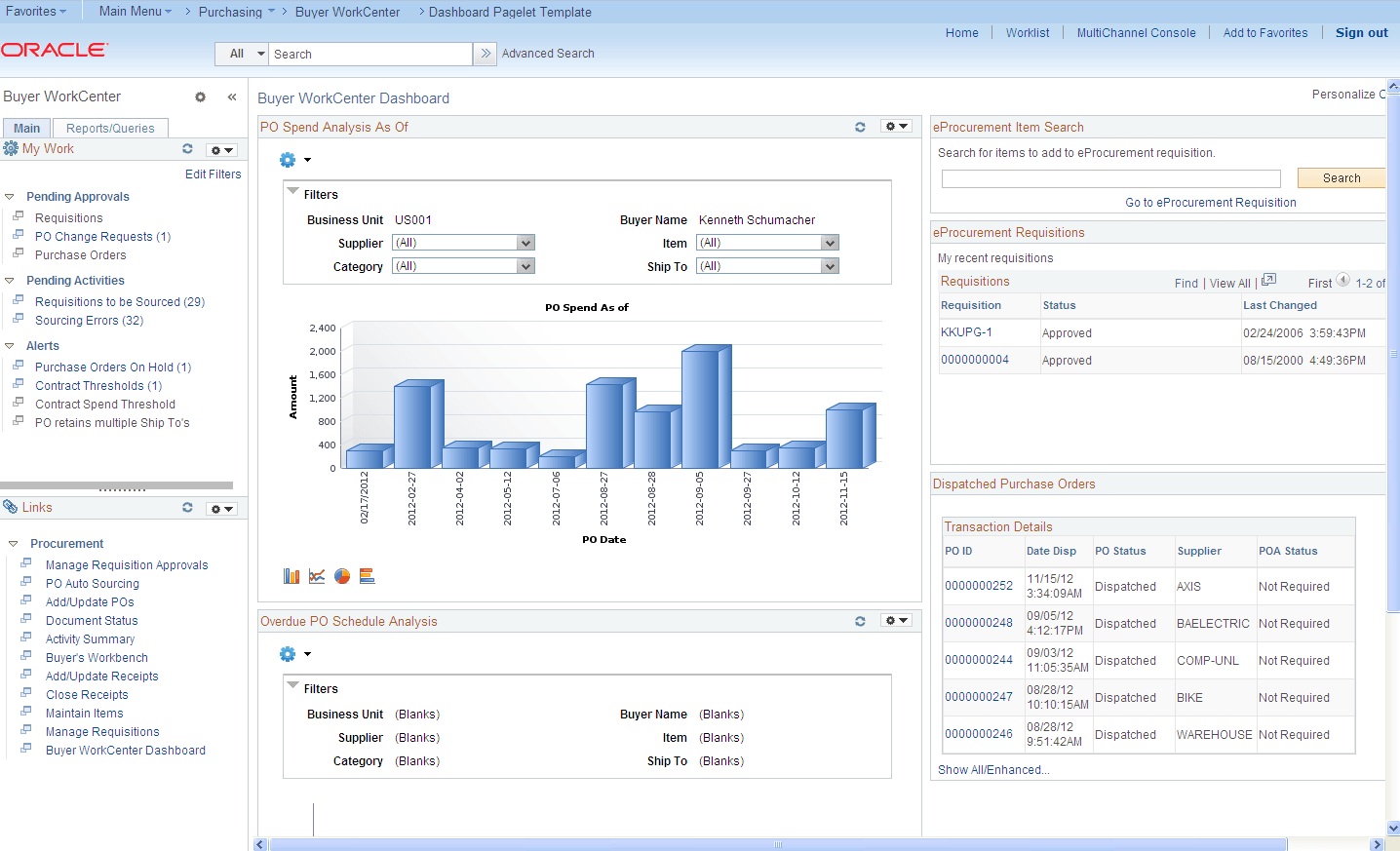
The WorkCenter pagelet area appears on the left side of the screen.
The Buyer WorkCenter Dashboard with summary information and charts appears on the right side of the screen. Transactional pages also display on the right side of the screen when a user clicks a pagelet link.
| Field or Control | Description |
|---|---|
|
|
Click the New Window icon next to a link in the WorkCenter pagelet area to open transactional information in a window outside the WorkCenter and Dashboard. Alternately, click a link in the WorkCenter pagelet area to open transactional pages in the Dashboard frame. |
|
Edit Filters |
Click the Edit Filters link on the My Work pagelet to modify the filters on worklist links registered in the My Work pagelet. |

For more information about the links that appear on the My Work pagelet, see Using the BuyerWorkCenter - My Work.
For more information about the links that appear on the Links pagelet, see Using the Buyer WorkCenter - Links.
For more information about the links that appear on the Queries and Reports/Processes pagelets, see Using the Buyer WorkCenter - Queries, Reports, and Processes.