Using the BuyerWorkCenter - My Work
The My Work pagelet of the Buyer WorkCenter displays work items assigned to the user and, depending on setup, the number of transactions or items. After the user completes transactions, the user manually refreshes the pagelet to update the number of transactions or items shown in parentheses next to the My Work links.
Existing Worklist notifications as well as the Alert/Warning Notification processes can be registered into the My Work pagelet as the type of Worklist and Alert/Warning Notification, respectively.
Users can modify filters for several of these pagelet entries, however, some links in the My Work pagelet are Workflow entries. Workflow entries are displayed on the standard Worklist entry page.
The following table lists the worklists that can be registered into the My Work pagelet.
| Existing Worklist | Drill to Details Page | Define Worklist Entry in My Work Pagelet Configuration¹ |
|---|---|---|
|
Contracts Expiry Threshold |
Contract Entry |
Contract Thresholds Contract Spend Threshold |
|
Sourcing Events to Approve |
Event Workbench |
Approval Routing |
|
Change Requests to Review |
PO Change Request Approval |
Change Request Approval |
|
Late PO Acknowledgements |
Manage POA |
Overdue POAs |
|
PO Acknowledgements (incoming from the supplier, need approval) |
POA Approval |
EDI PO Acknowledgement Online PO Acknowledgement Batch EDI PO Acknowledgement Batch Online PO Acknowledgement |
|
Purchase Orders to Approve |
PO Approval |
Virtual Approvals (AWE): Approve Chartfields Worklist |
|
Approval Framework
|
||
|
Requisitions to Approve |
Requisition Approval |
Virtual Approvals (AWE): Req Approval Worklist |
|
Approval Framework
|
Note:
¹ Each Worklist Entry in the last column of this table appears as a separate link in the My Work pagelet.
The following table lists the events and notifications that can be registered into the My Work pagelet.
| Notification Event | Process Name | Process Category |
|---|---|---|
|
A claim associated with a vendor rebate agreement is generated |
PO_VRBT_NOTIFY |
NOTIFY_CLAIMS_MGR |
|
A claim associated with a vendor rebate agreement is ready to be settled |
PO_VRBT_NOTIFY |
NOTIFY_SETTLEMENT_MGR |
|
Inventory Manager notified of material awaiting return to Supplier* |
PO_RTV_NOTIFY |
NOTIFY_INV_MGR_ADJ NOTIFY_INV_MGR_ISSUE NOTIFY_INV_MGR_MSR |
|
Change request from Requisition has been accepted or denied |
PO_CHNG_NOTIFY |
Notify requester of PO reject |
|
Notify requestor that Requisition has been sourced to a PO |
PO_RQSRCD_NOTIFY |
NOTIFY_REQUESTOR |
The following table lists the system-defined Application Classes that can be registered into the My Work pagelet. All available Application Classes for the Buyer WorkCenter are defined in this root application package: SRM_PO_WORKCENTER_DASHBOARD. A user filter is available on the system-defined entries, as noted in the table.
| Link Group and Link Text | Row Counts (in parenthesis) | Target/Transaction Area | Alternate Navigation | Filtered By | My Work System Link ID - App Class Name |
|---|---|---|---|---|---|
|
Alerts: Purchase Orders on Hold |
Purchase Orders that are on hold |
Purchase Orders On Hold page |
None |
Buyer, Business Unit |
Purchase Orders On Hold - PO:POsOnHold |
|
Pending Approvals: PO Change Requests |
Purchase Order Change Requests pending approval |
Approve Change Requests page |
|
Buyer, Business Unit |
PO Change Requests - PO:PoChgToApprove |
|
Pending Approvals: Purchase Orders |
Purchase Orders that are pending Approval Framework Approval activity |
Approve Purchase Orders page |
|
Buyer, Business Unit |
PO-PO:PoToApprove |
|
Pending Approvals: Requisitions |
Requisitions that are pending Approval Framework approval activity |
Manage Requisition Approvals page |
|
Business Unit, User ID, Approval Status |
Requisitions - PO:ReqToApprove |
|
Pending Activities: Requisitions to be Sourced |
Requisition lines that are in Approved status; filtered by the user specified criteria values |
Requisition Selection - Sourcing page |
|
Business Unit, Buyer |
Requisitions to be Sourced - PO:ReqToSource |
|
Pending Activities: Sourcing Errors |
PO Staged rows that are in Error status; filtered by the user specified criteria values |
Purchasing > Purchase Orders > Stage/Source Requests > Sourcing Workbench |
Sourcing Errors list |
Business Unit, Buyer, Stage Status |
PO Sourcing Errors - PO:PoSourceErrors |
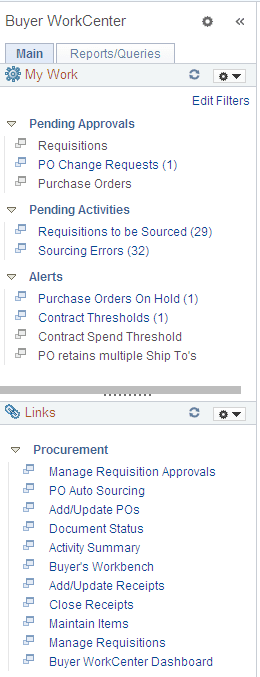
The sample Buyer WorkCenter shows the My Work pagelet as it might appear to a user.
This example illustrates the My Work pagelet on a sample Buyer WorkCenter.