Configuring Thresholds and Events for Procurement Operations
This section provides an overview of the Supplier Watch List Event Page (PO_EVENT_SWL).
Page Used to Supplier Watch List Event Page
| Page Name | Definition Name | Usage |
|---|---|---|
|
PO_EVENT_SWL |
Select the events you want to monitor in the Supplier Watch List Page. |
Supplier Watch List Event Page
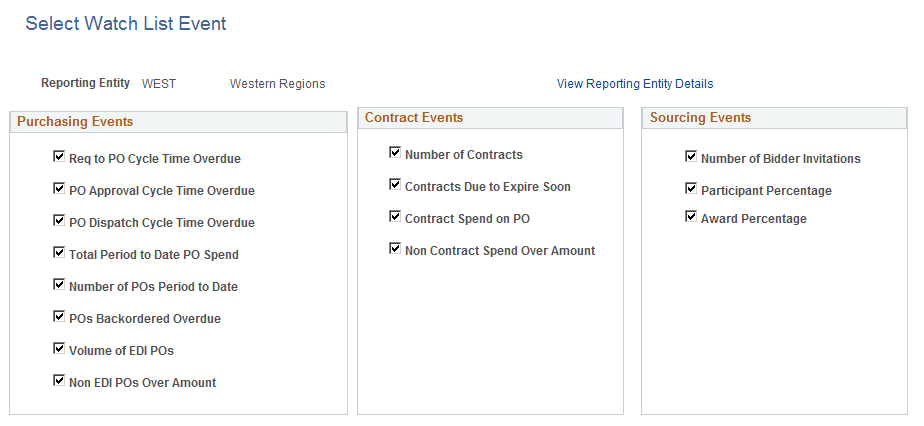
Use the Supplier Watch List Event to select the events you want to monitor in the Supplier Watch List.
Navigation:
This example illustrates the fields and controls on the Supplier Watch List Event page. You can find definitions for the fields and controls later on this page.
Define Event Threshold Page
This section provides an overview of the Define Event Threshold Page (PO_EVT_THRESH).
Page Used to Define Event Threshold Page
| Page Name | Definition Name | Usage |
|---|---|---|
|
PO_EVENT_THRESH |
Define system level thresholds. |
Define Event Threshold Page
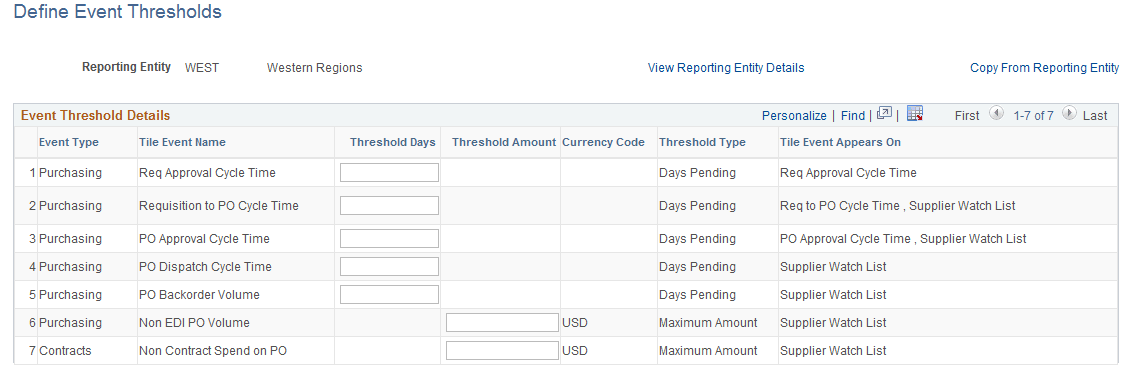
Use the Define Event Threshold page to define system level thresholds. A violation will appear for each Event on the Supplier Watch List when the transaction amount calculated or number of days pending exceeds the threshold established for the reporting entity.
Navigation:
This example illustrates the fields and controls on the Define Event Threshold Page. You can find definitions for the fields and controls later on this page.
| Field or Control | Description |
|---|---|
|
View Reporting Entity Details |
Displays information about the Reporting Entity, including the Business Units assigned. |
|
Copy From Reporting Entity |
This link will only be available when initially setting up the thresholds for the Reporting Entity. Use the link to copy the threshold values from another Reporting Entity to the current one. |
Event Threshold Details
| Field or Control | Description |
|---|---|
|
Threshold Days |
Indicates the minimum number of days that pending transactions should be included in the spend analysis for the Tile. In other words, transactions have to be pending for at least the specified number of days to be included. For example, with the ‘PO Approval Cycle Time’ event, a PO is only included if it has been in ‘Pending’ status for the number of days specified here or longer. |
|
Threshold Amount |
If the amount calculated for an event exceeds the threshold amount entered here, then it is marked as a violation in the Supplier Watch List. |
|
Currency Code |
Displays the currency of the Reporting Entity. |
|
Tile Event Appears On |
Displays the Tiles that are relevant to the Event. |