Create PO Close Short Default Rules Page
The PO Close Short Rules is defined by a Purchasing Rule ID. The Purchasing Rule ID can be assigned to one or more business units.
| Rule | Amount Only Indicator | Receiving Option | Match Line Option | How PO Value Will Be Set During Close Short Processing (Close Short Set Option) |
|---|---|---|---|---|
| 1 | No | Receiving Required | Full Match | RQ) Sum of Receipt Quantity * MQ) Matched Quantity RMGQ) Greater value of Matched Quantity or the Sum of Receipt Quantity NA) Disable |
|
2 |
Yes |
Receiving Required |
Full Match |
RA) Sum of Receipt Amount * MA) Matched Amount RMGA) Greater value of Matched Amount or Sum of Receipt Amount NA) Disable |
|
3 |
No |
Receiving Required |
ERS |
MQ) Matched Quantity VQ) Sum of Vouchered Quantity RMGQ) Greater value of Matched Quantity or the Sum of Receipt Quantity RVGQ) Greater value of the Sum of Vouchered Quantity or the Sum of Receipt Quantity NA) Disable |
|
4 |
Yes |
Receiving Required |
ERS |
RA) Sum of Receipt Amount * MA) Matched Amount VA) Sum of Vouchered Amount RMGA) Greater value of Matched Amount or Sum of Receipt Amount RVGA) Greater value of the Sum of Vouchered Amount or the Sum of Receipt Amount NA) Disable |
|
5 |
No |
Receiving Required |
No Match |
RQ) Sum of Receipt Quantity * VQ) Sum of Vouchered Quantity RVGQ) Greater value of the Sum of Vouchered Quantity or the Sum of Receipt Quantity NA) Disable |
|
6 |
Yes |
Receiving Required |
No Match |
RA) Sum of Receipt Amount * VA) Sum of Vouchered Amount RVGA) Greater value of the Sum of Vouchered Amount or the Sum of Receipt Amount NA) Disable |
|
7 |
No |
Receiving is Optional |
Full Match |
RQ) Sum of Receipt Quantity MQ) Matched Quantity * RMGQ) Greater value of Matched Quantity or the Sum of Receipt Quantity NA) Disable |
|
8 |
Yes |
Receiving is Optional |
Full Match |
RA) Sum of Receipt Amount MA) Matched Amount * RMGA) Greater value of Matched Amount or Sum of Receipt Amount NA) Disable |
|
9 |
No |
Receiving is Optional |
ERS |
RQ) Sum of Receipt Quantity * MQ) Matched Quantity VQ) Sum of Vouchered Quantity RMGQ) Greater value of matched Quantity or the Sum of Receipt QuantityRVGQ) Greater value of the Sum of Vouchered Quantity or the Sum of Receipt QuantityNA) Disable |
|
10 |
Yes |
Receiving is Optional |
ERS |
RA) Sum of Receipt Amount * MA) Matched Amount VA) Sum of Vouchered Amount RMGA) Greater value of Matched Amount or Sum of Receipt Amount RVGA) Greater value of the Sum of Vouchered Amount or the Sum of Receipt Amount NA) Disable |
|
11 |
No |
Receiving is Optional |
No Match |
RQ) Sum of Receipt Quantity* VQ) Sum of Vouchered Quantity RVGQ) Greater value of the Sum of Vouchered Quantity or the Sum of Receipt Quantity NA) Disable |
|
12 |
Yes |
Receiving is Optional |
No Match |
RA) Sum of Receipt Amount * VA) Sum of Vouchered Amount RVGA) Greater value of the Sum of Vouchered Amount or the Sum of Receipt Amount NA) Disable |
|
13 |
No |
Do Not Receive |
Full Match |
MQ) Matched Quantity * NA) Disable |
|
14 |
Yes |
Do Not Receive |
Full Match |
MA) Matched Amount * NA) Disable |
|
15 |
No |
Do Not Receive |
No Match |
VQ) Sum of Vouchered Quantity * NA) Disable |
|
16 |
Yes |
Do Not Receive |
No Match |
VA) Sum of Vouchered Amount * NA) Disable |
|
17 |
No |
Do Not Receive |
ERS |
VQ) Sum of Vouchered Quantity NA) Disable * |
|
18 |
Yes |
Do Not Receive |
ERS |
VA) Sum of Vouchered Amount NA) Disable * |
Note:
(*) indicates Predefined setting.
The Close Short check box for PO Line / Schedules will be deselected and disabled once the user disables a rule. This holds true for PO Add / Update as well as the PO Close Short WorkBench.
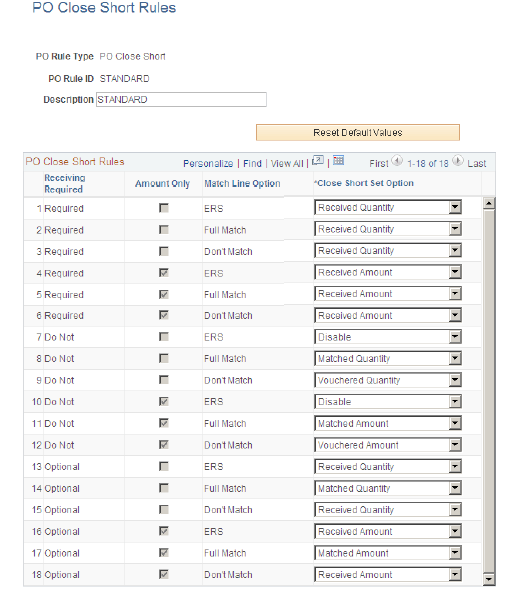
Use the PO Close Short Rules page for maintaining the PO Close Short Rules. When a new Purchasing Rule ID is added, the 18 rules will be inserted with the Predefined settings as shown in the previous table. The Close Short Set Option can also be modified according to a desired value.
Note:
A STANDARD rule ID would be delivered, which would be used as a template for any new rules to be created.
The 18 rules would be copied from the STANDARD template except for the Close Short Set Option, which would be provided by default as shown in the above table.
This example illustrates the fields and controls on the PO Close Short Rules page. You can find definitions for the fields and controls later on this page.
| Field or Control | Description |
|---|---|
|
Reset Default Values |
On selecting Reset Default Values, the default values for the rule in the rules table appear by default. |