Understanding the Close Requisitions Process
Use the Close Requisitions Application Engine process (PO_REQRCON) to close requisitions that are fully canceled or fully sourced and no longer need to be modified. When you run the Close Requisitions process, it reconciles requisition-related settings and statuses to change the status of applicable requisitions to C (completed).
To perform the Close Requisitions process you need to have the authorization to do so. To enable users to be able to close requisitions, you must establish their authorizations using the User Preferences- Requisition Authorizations page. Using this page you can give the user the ability to close requisitions as well as override non-qualified requisitions for close.
The benefit of this status change is that completed requisitions no longer appear in your list of available requisitions when you access requisition pages in update or display mode. These completed requisitions are also removed from the view in many other situations in which the available options have been set to exclude completed or canceled requisitions. Removing these requisitions from these prompts improves system performance and decreases the time required to find requisitions that you must modify.
If commitment control is enabled, the Close Requisitions process also sets the budget header and line statuses, as well as the requisition distribution close flags (KK_CLOSE_FLAG and PROCESS_MANUAL_CLOSE). This allows the Commitment Control Budget Processor process (FS_BP) to liquidate pre-encumbrance budget amounts for outstanding requisitions.
Although the Close Requisitions process is optional and you can run it at any time, you should run the process at the end of each month to help improve the efficiency of your requisitioning process. Schedule the Close Requisitions process to run at an interval of your choosing using the PeopleSoft Process Scheduler or run it manually using the Close Requisitions page.
To understand the Close Requisitions process, it is important to know where the process fits in the PeopleSoft Purchasing transaction life cycle. This diagram illustrates the transaction flow leading to the Close Requisitions process:
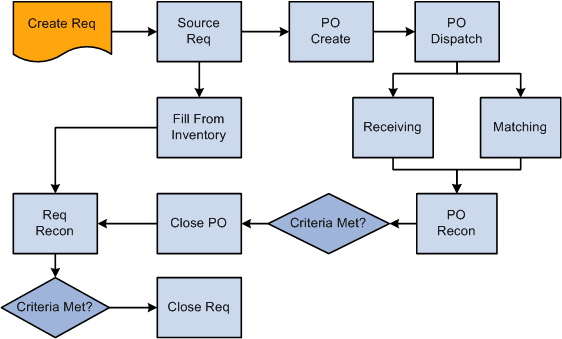
When you initiate the Close Requisitions process from the Close Requisitions page, you have three processing options on the Process Scheduler Request page:
-
Select Close Requisition SQR Report (PORQ009) to produce the Requisition Reconciliation report.
-
Select Close Requisitions Application Engine process (PO_REQRCON) to run the Close Requisitions process.
-
Select Close Requisitions a multi-process job (PO_REQRQ) to run the Close Requisitions process and produce the Requisition Reconciliation report.
Note:
If necessary, you can run the Requisition Reopen Application Engine process (PO_REQREOPN) to undo the changes made by the Close Requisitions process.
See the product documentation for PeopleTools: Process Scheduler