UOM Conversion Rate Defaults
When you convert one transaction type to another, the UOM on the originating transaction may need to be converted to the UOM that is required for the new transaction. This kind of UOM conversion may be performed when you source a requisition to a purchase order, or award an RFQ and create a purchase order for it.
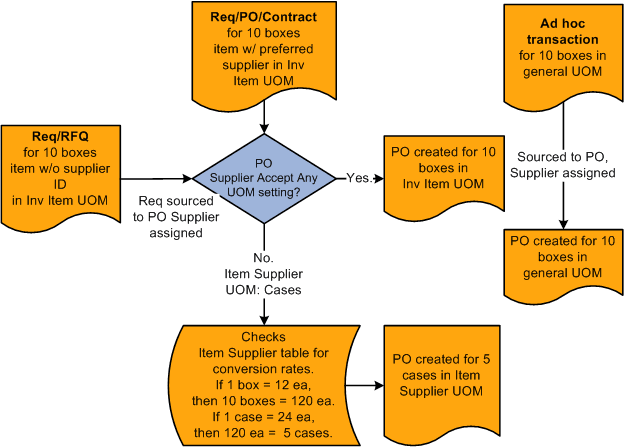
For example, suppose that you have a requisition with no supplier for a quantity of 10 boxes of an item in the inventory item UOM. When you source the requisition to a purchase order, and the supplier assigned to the purchase order does not accept any UOM, the item supplier UOM overrides the inventory item UOM. If the supplier has a preferred UOM of cases, the requisition quantity of 10 boxes in the inventory item UOM must be converted to the item supplier UOM of cases.
To accomplish this, the system uses the UOM conversion rate between boxes and the standard UOM defined on the Inventory Item table. It then accesses the UOM conversion rate between cases and the standard UOM defined on the Item supplier table. If none exists, the system uses the conversion rate defined on the Inventory Item table. The system then reconciles the quantities in the standard UOM to derive the quantity to be ordered in the preferred item supplier UOM of cases.
If the chosen supplier accepts any UOM, you can create the purchase order from the requisition with the inventory item UOM, and no conversion is necessary.
When you source an ad hoc item transaction to a purchase order, the general UOM on the originating transaction is carried to the purchase order and no conversion is performed.
This diagram illustrates the process: