UOM Defaulting
The PeopleSoft Purchasing UOM default hierarchy is based in part on the type of transaction that you create (RFQ, requisition, purchase order, contract, or procurement card). If a supplier is involved in the transaction, the setting of the Accept Any UOM check box for the supplier on the Purchasing Attributes - Item Supplier page is also a factor in the UOM default hierarchy.
This diagram illustrates the UOM default hierarchy:
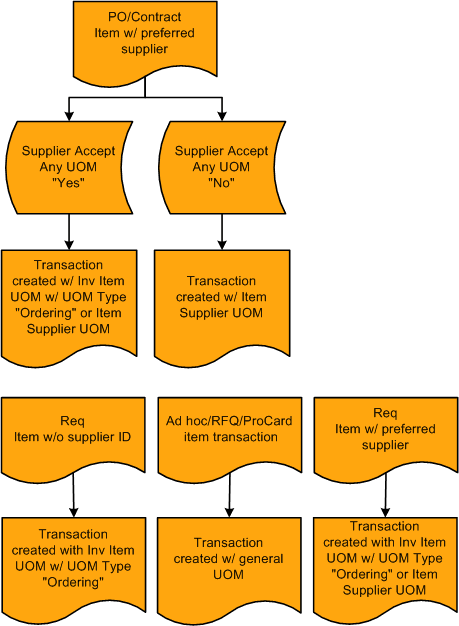
When you enter a requisition with a specified item ID, the system searches for a preferred supplier for the item. If a preferred supplier exists, the preferred supplier default UOM appears on the requisition.
If the item ID that you add to a requisition has no Supplier ID, the UOM appears by default in the item standard UOM defined for the item.
If you are creating an ad hoc, RFQ, or procurement card transaction, the system creates the transaction with the general UOM that you specify on the transaction.
Related Topics