Revenue Estimate Review Page
Use the Revenue Estimate Review page (AR_CC_TRAN) to view source transactions that the Revenue Estimate process created for all activities for an item.
You can view both completed transactions and transactions with errors. However, you can change only the budget date for the transactions.
Navigation:
This example illustrates the fields and controls on the Revenue Estimate Review page. You can find definitions for the fields and controls later on this page.
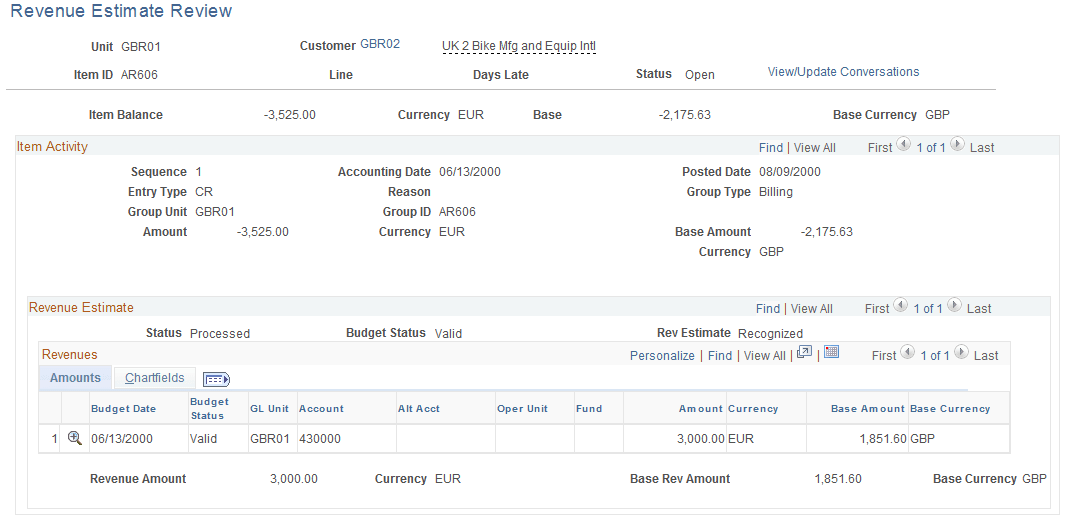
Use the Item Activity scroll area to view each activity for an item on the Revenue Estimate Review page. Use the Revenue Estimate scroll area to see source transactions for an item activity. The Revenues grid displays information for each source transaction.
| Field or Control | Description |
|---|---|
|
|
Click the Budget Check icon to run the Budget Processor, which checks the source transactions and creates the entries in the revenue bucket for the budget. This icon is available only if the transactions have no revenue estimate errors. It is not available if you already ran the Budget Processor. Note: The system displays a warning message if transactions passed budget checking but receive a warning status. |
