Using the PeopleSoft Classic Receivables WorkCenter - My Work
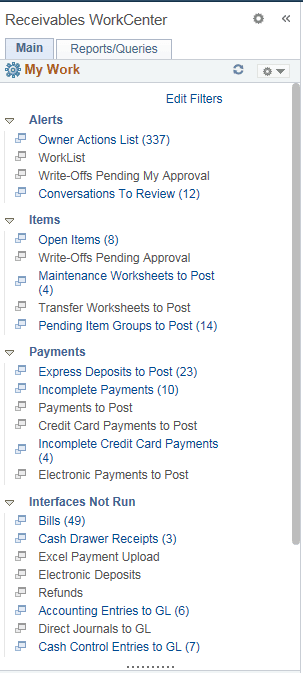
The My Work pagelet provides links that consolidate a user’s actionable tasks, using the user ID as the Assigned User ID to show only items in their own queue.
Note:
This feature is no longer supported. However, a fluid version of the Receivables WorkCenter functionality is supported on the Credit to Cash Operations Home Page. See Using the PeopleSoft Fluid Receivables WorkCenter.
The My Work pagelet includes these functional groupings for links:
-
Alerts
-
Items
-
Payments
-
Interfaces Not Run
-
Exceptions
This example illustrates the fields and controls on the PeopleSoft Classic Receivables WorkCenter - My Work pagelet.
| Field or Control | Description |
|---|---|
|
Edit Filters |
Click this link to modify filters on many links registered in the My Work pagelet as an end-user. On the Edit Filters page, click the Edit Filter icon of the filter you want to modify. Select filter values on the Configure Filter Values page. To configure filter definitions and values as a System Administrator, see the product documentation for the Enterprise Components: Configure Filter Values Page. |