Integration with PeopleSoft Services Procurement
Integration with PeopleSoft Services Procurement enables you to:
-
Initiate PeopleSoft Services Procurement service requisitions from within PeopleSoft Resource Management to fulfill resource requests, and navigate to requisitions to make updates.
-
Create assignments from service requisitions to fulfill resource requests.
-
View the fulfillment status of service requisitions.
This diagram illustrates the process of using a PeopleSoft Services Procurement service requisition to fulfill a resource request if you allow non-employee data to be maintained in PeopleSoft Resource Management:
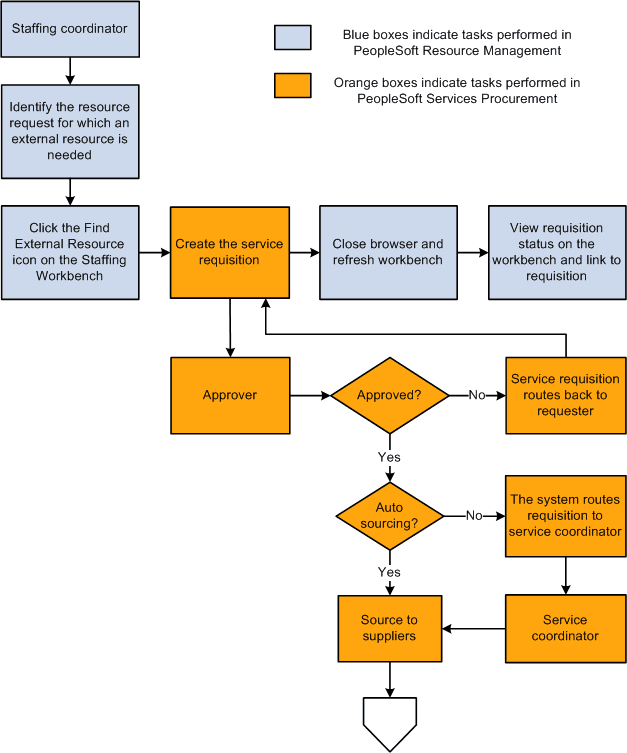
This diagram illustrates the process of using a PeopleSoft Services Procurement service requisition to fulfill a resource request if you allow non-employee data to be maintained in PeopleSoft Resource Management:
Generate Service Requisition
The term service provider is used to describe non-employees in PeopleSoft Services Procurement who can be selected to fulfill service requisitions in PeopleSoft Services Procurement. From the Staffing Workbench - Fulfill Orders page in PeopleSoft Resource Management, you can create a Services Procurement requisition and select a service provider to fulfill a resource request.
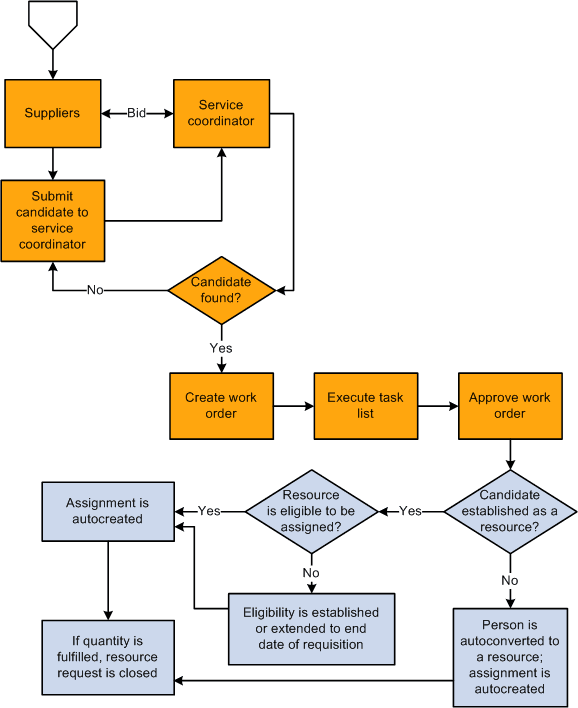
If you select a service provider to fulfill a service requisition in PeopleSoft Services Procurement and the requisition is used to fulfill a resource request, the system checks to see if the service provider is established as an eligible resource in PeopleSoft Resource Management. If the service provider is not an eligible resource and you allow non-employee data to be maintained in the Financials database, one of these actions occurs:
-
If you established the service provider as a resource previously, the system extends the existing resource's eligibility date to the end date of the requisition.
-
If you did not establish the service provider as a resource, the system creates an employee record with a personnel status value of N (non-employee), establishes the employee as a resource, and specifies the resource's eligibility end date as the end date on the requisition.
When the system automatically creates an employee record for a service provider, the default business unit, department, location, supervisor, job, standard hours, standard work period, and holiday schedule field values appear on the Installation Options - Resource Management page.
After you establish the service provider as an eligible resource in PeopleSoft Resource Management, then the system creates an assignment for the resource automatically.
Users receive a message if they try to select a service provider for a resource request that is already fulfilled in PeopleSoft Resource Management.
Create Assignment from a Service Requisition
In PeopleSoft Services Procurement you can select a candidate to fulfill a service requisition. If the requisition was generated from a PeopleSoft Resource Management resource request, the service requisition information is used to create an assignment and establish the candidate as a resource. If the assignment fulfills the outstanding demand for the resource request, the request is closed.
Note:
Creating an assignment from a service requisition does not update work history in the resource profile.
View and Track Requisition Status
From the Staffing Workbench - Fulfill Orders page in PeopleSoft Resource Management, you can review the number of external requisitions initiated, filled, or canceled for each resource request.