Specifying My Assignments Options
To specify My Assignments options, use the My Assignments Options component (RS_MYASSGN_OPT).
This topic discusses how to select resource charts and parameters.
Page Used to Specify My Assignments Options
| Page Name | Definition Name | Usage |
|---|---|---|
|
RS_MYASSGN_OPT |
Select resource charts and parameters to appear in the My Assignments component for the user. |
My Assignments Options Page
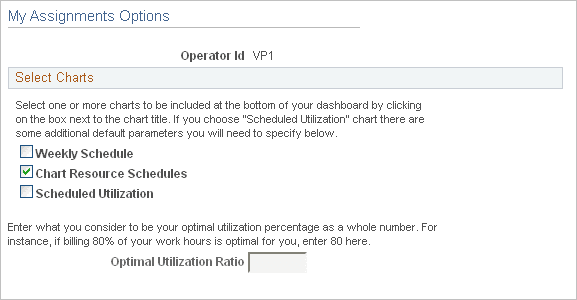
Use the My Assignments Options page (RS_MYASSGN_OPT) to select resource charts and parameters to appear in the My Assignments component for the user.
Navigation:
This example illustrates the fields and controls on the My Assignments Options page. You can find definitions for the fields and controls later on this page.
| Field or Control | Description |
|---|---|
|
Operator Id |
Displays the user ID of the resource who is logged into this session. |
|
Weekly Schedule |
Select to display your weekly schedule on the My Assignments - Assignments page. |
|
Chart Resource Schedules |
Select to display a Gantt chart of your four-week schedule on the My Assignments - Assignments page. |
|
Scheduled Utilization |
Select to display a chart of your personal four-week scheduled utilization on the My Assignments - Assignments page. If you select this option, you must enter a value in the Optimal Utilization Ratio field. |
|
Optimal Utilization Ratio |
Enter the percentage of capacity required for you to be treated as optimally utilized on the Scheduled Utilization chart. Enter a whole number. For example, 80 indicates that you must be at least 80 percent utilized for the system to treat you as optimally utilized. This field is required if you select the Scheduled Utilization chart to appear on the My Assignments - Assignments page. |