Unfulfilled Open Service Order Lines Page
Use the Unfulfilled Open Service Order Lines (RS_SO_LINE_OPEN_WC) page to display all Service Orders Line in Open status for a logged on user.
Navigation:
This example illustrates the fields and controls on the Unfulfilled Open Service Order Lines page.
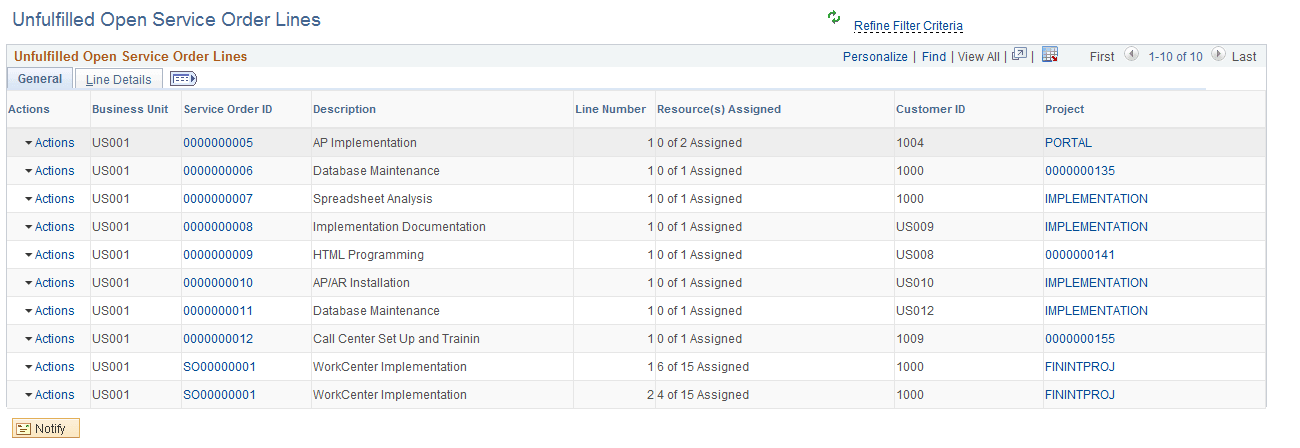
Click the Actions arrow button to execute the following actions on the exceptions:
| Field or Control | Description |
|---|---|
|
View Assignments |
The View Assignments action is available only when there is an Assignment created for a Service Order line. When you click View Assignments , a bar graph displays that gives you a count of Assignments and its status. Click the bar graph, and then click Detailed View to view details of the Assignment in a grid. From the grid, you can further drill down to view the details of the Assignment. The following actions are available in the grid:
|
|
Fulfill Service Order Line |
The Fulfill Service order Line action launches the fulfill order page displaying the Service Order Line. |
|
View Bid\Recommend Resources |
The View Bid\Recommend Resources action opens a new page with the list of Resources who are either Recommended or have Bid on the Service order Line. The page displays the Resource name along with its Availability score based on the Service Order Line dates. The page has its own set of actions associated with it which helps the user to take some specific action on each of the Resources displayed on the page. These actions are :
|