Reviewing the Survey
This topic discusses how to review the survey.
Pages Used to Review the Survey
| Page Name | Definition Name | Usage |
|---|---|---|
|
SP_SUR_REV_ROSTER |
Search for completed surveys to review. |
|
|
SP_SUR_USR_RES |
Review work order evaluation summaries. |
Review Survey Summary Page
Use the Review Survey Summary page (SP_SUR_REV_ROSTER) to search for completed surveys to review.
Navigation:
Enter a specific business unit, work order ID, survey ID, supplier ID, service provider, service contact, user ID (survey recipient), or status to restrict the surveys to only those that match. Or leave those fields blank to pick up all values. Click the Search button to return surveys that a user can complete for himself or on behalf of another user
The Status field displays work order surveys that are completed. Initially only those particular surveys that a user must complete as the survey recipient appear in the Survey List.
| Field or Control | Description |
|---|---|
|
Survey ID |
Click to access the Review Survey User Responses page, where you can review completed work order evaluation summaries. |
Review Survey User Responses Page
Use the Review Survey User Responses page (SP_SUR_USR_RES) to review work order evaluation summaries.
Navigation:
Click the Search button to locate survey responses.
This example illustrates the fields and controls on the Review Survey User Responses page. You can find definitions for the fields and controls later on this page.
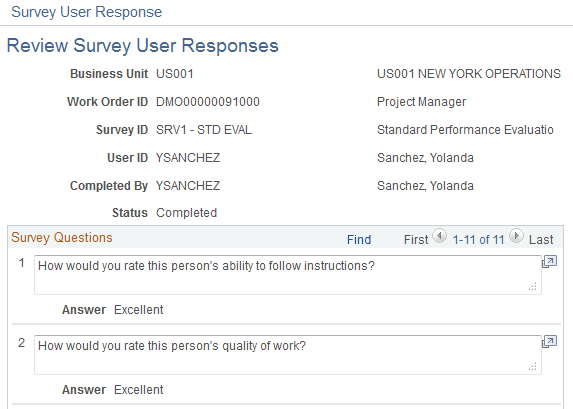
| Field or Control | Description |
|---|---|
|
User ID |
Review the name of the survey recipient. |
|
Completed By |
Review name of the recipient that filled out the survey. This may differ from the user name. |
|
Status |
View completed surveys. Use the My Survey Summary page to view surveys that are not started, in progress, or canceled. |