On-Account Payments Tile and Pivot Page
Use the On-Account Payments tile to view the amount of open on-account (WS-05) and prepaid (WS-04) payments and the users currently assigned to collect the payments. This helps to appropriately distribute the workload.
Navigation:
This example illustrates the fields and controls on the On-Account Payments Tile.
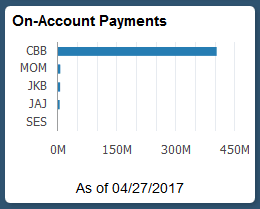
Select the On-Account tile to view the pivot grid. On the Y-axis, the tile shows either the Responsible Party or Entry Type. On the X-axis, the tile shows the Item Count or Display Balance.
Select the following facets to filter data displayed in the pivot grid:
-
Business Unit
-
Responsible Party
-
Currency
-
Entry Type
Add, delete, or move the following pivot grid columns as desired:
-
Business Unit
-
Responsible Party
-
Currency
-
Entry Type
-
Item Count
-
Item Balance
-
Display Balance
-
Display Currency