Change Request Aging Pagelet
The Change Request Aging pagelet displays a pivot grid which displays the aging breakout of the change requests in pending status.
This example illustrates the fields and controls on the Change Request Aging Chart.
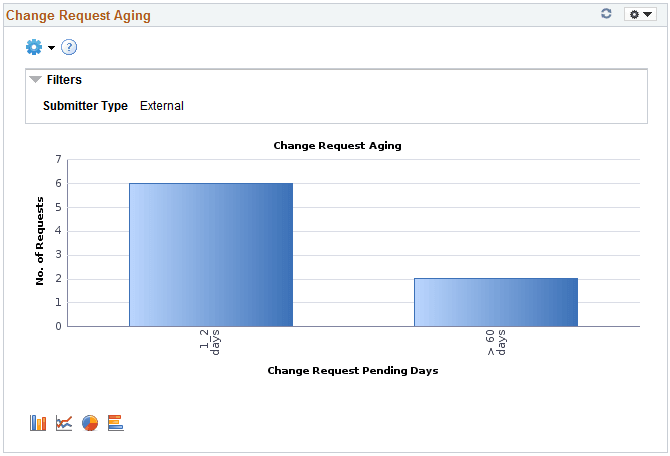
Click on the graph and then click Detailed View to view all the change request transactions that represent the chart. You can also drill down by Submit Date, Requestor, and Short Supplier Name.
This example illustrates the fields and controls on the Change Request Aging Grid.
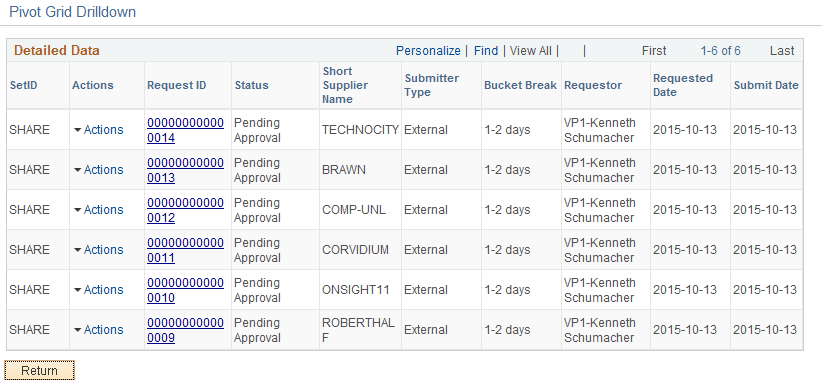
From the Detailed View, the View Approval Information option is available under the Actions column for those transactions that are not approved. Click View Approval Information to navigate to the Manage Request Approval page and view more details about the transaction. The Request ID column has a link to the View History page for the transaction.
The Prompt page for the pivot grid includes a time range selection based on the last updated date.
The Charting Options for the pivot grid includes chart filter selection options for Bucket Break, Requestor, Short Supplier Name, Submit Date, and Submitter Type.