My Preferences Page (Receivables)
Use the My Preferences Page (PTGP_USER_PERS_FL) to set up the tile display content.
Navigation:
Select Receivables on the right pane.
This example illustrates the fields and controls on the Receivables Preferences page. You can find definitions for the fields and controls later on this page.
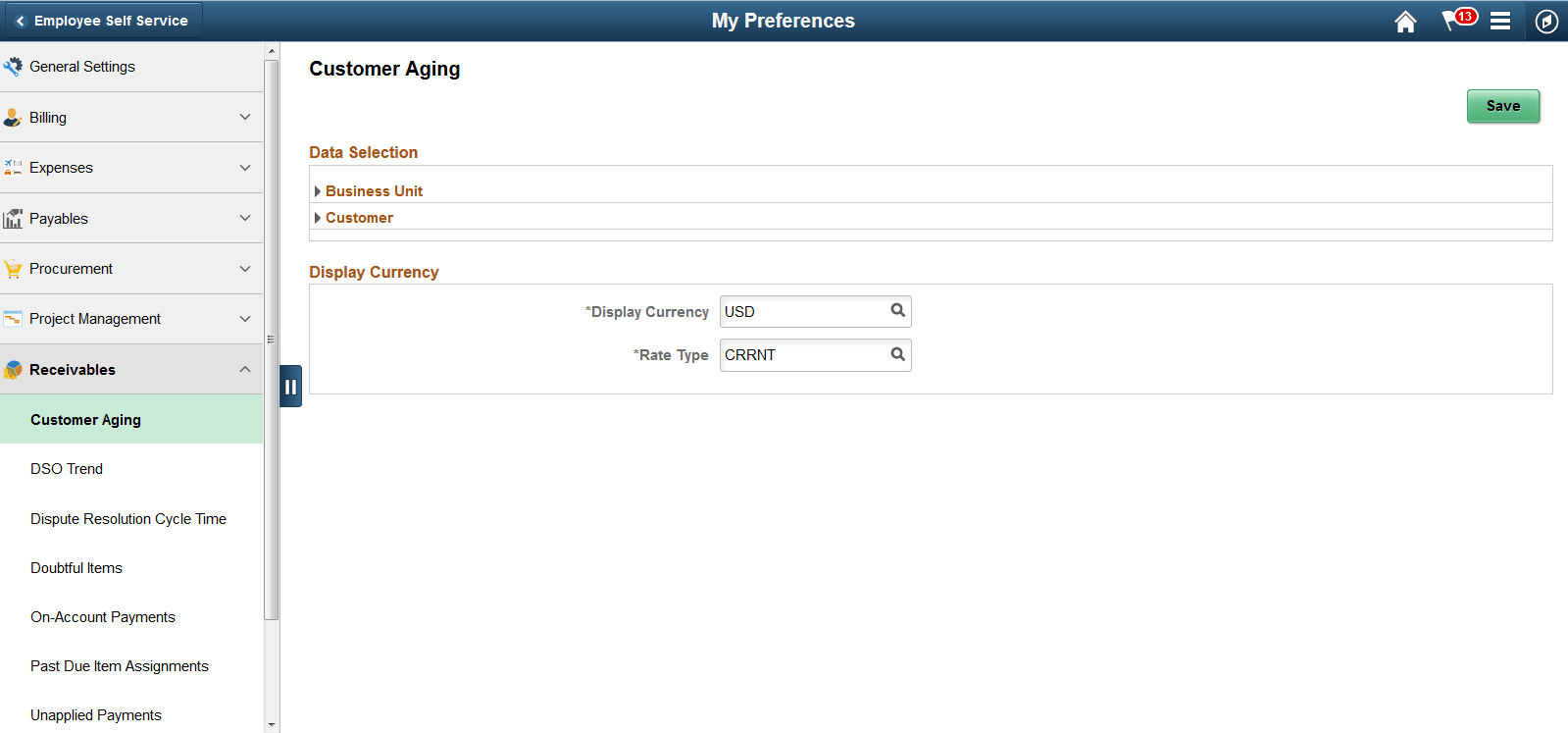
Preferences – Customer Aging
The following settings are required:
| Field or Control | Description |
|---|---|
|
Business Unit |
Select a unit. The default is the group unit or, if group unit is not defined, the business unit from the user preferences. |
|
Customer |
|
|
Display Currency |
Currency code and rate type are required. |
Preferences – DSO Trend
The following settings are required:
| Field or Control | Description |
|---|---|
|
Business Unit |
Select a unit. The default is the group unit or, if group unit is not defined, the business unit from the user preferences. |
|
Customer Set ID |
Required field. This field’s default is the SetID defined in the user preferences. |
|
Customer ID |
Required field. Select only one customer. |
Preferences – Dispute Resolution Cycle Time
The following settings are required:
| Field or Control | Description |
|---|---|
|
Resolution Date Option |
Select a date range option. Note: The selected date range must be within 180 days. Reporting views are utilized to improve performance by limiting the amount of data available to 180 days date range (6 months). A process must be configured and run to ensure the data displayed is current. This process is located under Setup Financials/Supply Chain > Operational Reporting > Operational Efficiency. |
|
Business Unit |
Select a unit. The default is the group unit or, if group unit is not defined, the business unit from the user preferences. |
|
Customer |
|
|
Responsible Party |
Required field. Select from Collector, AR Specialist, Credit Analyst, Broker, or Sales Person. This field defaults to Collector. |
|
Display Currency |
Currency code and rate type are required. |
Preferences – Doubtful Items
The following settings are required:
| Field or Control | Description |
|---|---|
|
Business Unit |
Select a unit. The default is the group unit or, if group unit is not defined, the business unit from the user preferences. |
|
Customer |
|
|
Responsible Party |
Required field. Select from Collector, AR Specialist, Credit Analyst, Broker, or Sales Person. This field defaults to Collector. |
|
Display Currency |
Currency code and rate type are required. |
Preferences – On-Account Payments
The following settings are required:
| Field or Control | Description |
|---|---|
|
Business Unit |
Select a unit. The default is the group unit or, if group unit is not defined, the business unit from the user preferences. |
|
Customer |
|
|
Responsible Party |
Required field. Select from Collector, AR Specialist, Credit Analyst, Broker, or Sales Person. This field defaults to Collector. |
|
Display Currency |
Currency code and rate type are required. |
Preferences – Past Due Item Assignments
The following settings are required:
| Field or Control | Description |
|---|---|
|
Business Unit |
Select a unit. The default is the group unit or, if group unit is not defined, the business unit from the user preferences. |
|
Customer |
|
|
Responsible Party |
Required field. Select from Collector, AR Specialist, Credit Analyst, Broker, or Sales Person. This field defaults to Collector. |
Preferences – Unapplied Payments
| Field or Control | Description |
|---|---|
|
Business Unit |
Select a unit. The default is the group unit or, if group unit is not defined, the business unit from the user preferences. |
|
Display Currency |
Currency code and rate type are required. |