Past Due Items Assignments Tile and Pivot Page
Use the Past Due Items Assignments tile to view the number of past due invoices and the users currently assigned to collect the invoices. This helps to distribute the workload appropriately to the users.
Navigation:
This example illustrates the fields and controls on the Past Due Items Assignments tile.
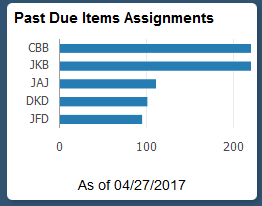
Select the Past Due Items Assignments tile to view the pivot grid. On the Y-axis, the tile shows the Responsible Party and on the X-axis, the tile shows the Item Count.
Select the following facets to filter data displayed in the pivot grid:
-
Business Unit
-
Responsible Part
-
Currency
Add, delete, or move the following pivot grid columns as desired:
-
Business Unit
-
Responsible Part
-
Currency
-
Item Count
-
Item Balance