Requisitions to be Sourced Pagelet
Access the Requisitions to be Sourced pagelet.
This example illustrates the fields and controls on the Requisitions to be Sourced pagelet. You can find definitions for the fields and controls later on this page.
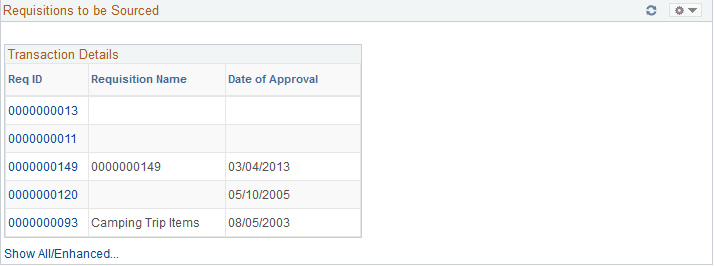
This pagelet displays recently approved requisitions for the buyer that have not yet been sourced to a supplier.
| Field or Control | Description |
|---|---|
|
Req ID (requisition ID) |
Click this link to access the requisition. If the requisition originated in PeopleSoft eProcurement, you will be transferred to the Requisition Details page. From there, you can transfer to the PeopleSoft eProcurement Manage Requisitions component. If the requisition originated in PeopleSoft Services Procurement, you will be transferred to the PeopleSoft eProcurement Manage Requisitions component. If the requisition originated in PeopleSoft Purchasing and PeopleSoft eProcurement is not installed, you will be transferred to the Maintain Requisitions - Requisition page. From there, you can transfer to the Add/Update Requisitions component. If both PeopleSoft Purchasing and PeopleSoft eProcurement are installed you will always be transferred to the PeopleSoft eProcurement Manage Requisitions component. |
|
Show All/Enhanced |
Click this link to access the Search (requisitions to be sourced) page. Use this page to enter search criteria for a different set of requisitions. After you enter the search criteria you are able to see the results of the search using the Filter Results page. |