Spend By Category Pagelet
Access the Spend By Category pagelet.
This example illustrates the fields and controls on the Spend By Category pagelet. You can find definitions for the fields and controls later on this page.
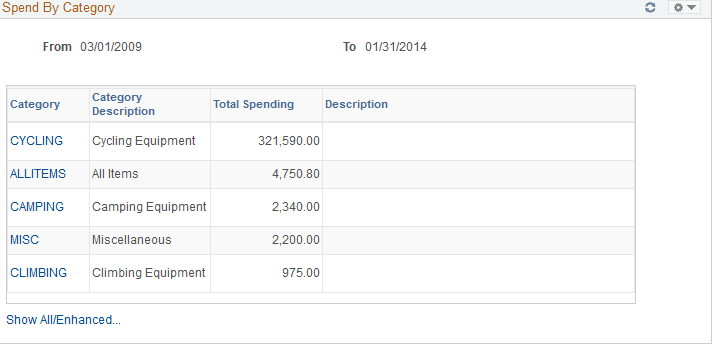
This pagelet will display all historic and future purchase order spend for the buyer by item category. On the initial pagelet, the total spend will be summarized by category and will display in descending order based on total spend amount.
If you have selected the two column format for the dashboard, this pagelet is expanded and shows the Historical Spend and Future Spend amounts in addition to the total spend by category. The amount of history and future spend are dependent on the number of prior and future periods defined on the Buyer Setup - Dashboard page. The historical spend is the sum of the schedule lines for that category for the number of periods specified. For example, if you set up a buyer with 8 prior periods and 3 future periods using the Buyer Setup - Dashboard page, the amount that displays for historical spend will be the sum of the prior 8 periods of schedule lines, summarized by category.
Historical is considered any schedule prior to today's date up to the beginning date of the first period in the historical range. For example, today is 11/01/06. You set up the buyer with 8 prior and future periods using the Buyer Setup - Dashboard page. March would be the first of the historical periods. March's period is defined as 03/01/06 to 03/31/06. Therefore the historical date range would be 03/01/06 to 10/31/06.
Future spend is the sum of the schedule lines for today's date, plus the remainder of the current period plus, the next three periods, summarized by category. In our example, the future date range would be 11/01/06 to 02/28/07.
If you selected the three column format for the dashboard, only the category, description and total spend amount are displayed.
| Field or Control | Description |
|---|---|
|
Category |
Click this link to access the View Spend by Category page. Use this page to view historical and future spend for the selected category. |
|
Show All/Enhanced |
Click this link to access the Spend By Category page. Use this page to view all the spend by category information. |