Supplier Homepage — External Page (Pre-Login)
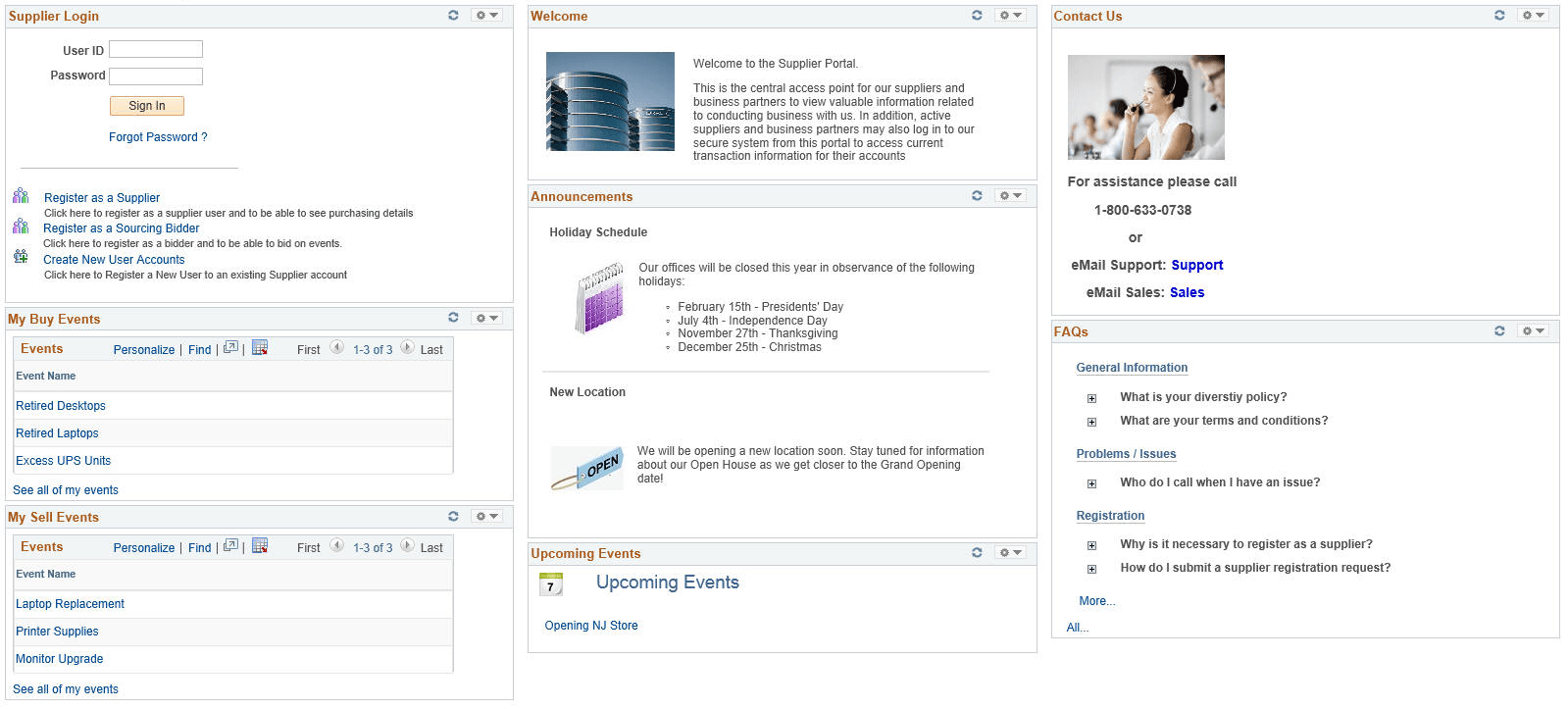
Use the pre-login homepage to display general information to all suppliers or potential suppliers. Helpful information created by your organization is displayed in the appropriate pagelets to inform viewers about topics of interest to them.
The Supplier Login pagelet (SCP_LOGIN) is included here for easy to the internal Supplier Homepage by existing users, or to the registration process by potential users.
This example illustrates the fields and controls on the Supplier Homepage - External.
See the topics Registering Online and Setting Up Public Access to Supplier Registration
You must enable the pagelets you want on the Homepage by navigating to the Tab Content - Tab Content page. See the section Selecting the Pagelets or Tiles That Appear on Homepages from the chapter Managing Homepages in:
PeopleTools: Portal Technology
To select the pagelets you want to display on the Supplier Homepage, select the checkbox against the pagelet name listed under each product and save the page. For example, select the Sign In pagelet listed in the PeopleSoft Applications section and the Registrations pagelet listed in the Supplier Portal section.
System Administrator uses Content Management pages to include, exclude, or rearrange pagelets and content on the Supplier Homepage. See Managing Content for the Comprehensive Supplier Portal