Event Creation
Three types of events exist in PeopleSoft Strategic Sourcing:
-
A sell event: the sale of goods that you own (equivalent to a forward auction).
-
A buy event: the purchase of goods or services (equivalent to a request for purchase or quote or a reverse auction).
-
An RFI event: a request for information.
The event creator must have the appropriate roles to create events. PeopleSoft Strategic Sourcing comes with two user roles: the Event Buyer role and the Event Seller role. The Event Buyer role can create buy events; the Event Seller role can create sell events. However, when you create events, the allowable event formats and types are based on user preference settings, not on roles.
This diagram illustrates the Sourcing Offer process for procuring items or services:
This diagram illustrates the Sourcing Offer process for procuring items or services, with tasks arranged by Buyer, Supplier, and Contract Administrator
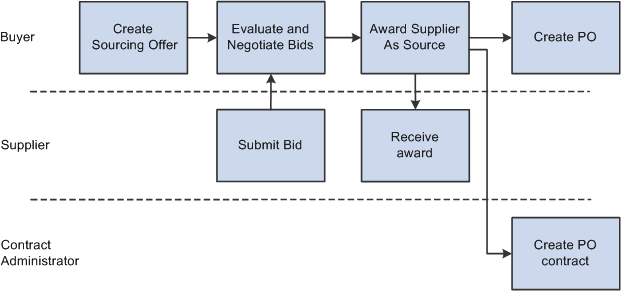
To create a sourcing offer:
-
Plan and create a buy or sell event.
-
Define bid factors, item or service specifications, and due dates.
-
(Optional) Invite collaborators to provide event input.
-
Invite bidders to bid on the event, and post the event for bidding.
When you create an event, you provide bidders an overall description of the event at the header level, with item-specific details at the line level. You can copy a previous event, purchase order, requisition, contract, PeopleSoft Engineering bill of material (BOM), PeopleSoft Manufacturing BOM, PeopleSoft Supply Planning planned order, or RFI to create a new event, and save events to use as templates. You can also attach documents and image files to the event to provide bidders with precise information about what you are buying or selling.
Specify at the header level any bid factors that pertain to the entire event. Then, at the line level, specify bid factors that apply to specific items. For each bid factor, set a weighting, letting the bidder know how much value you give to that portion of the bid. Price is, by default, the first bid factor of any line, and you also set a weighting for it. You can enter bid factors that you answer without displaying them to the bidders. These bid factors can be for subjective responses, such as current business relationship or interview results.
You can specify a list of bidders to invite to the event. You can modify this list by inviting some of them to bid only on specified line items. You can also specify an event as public to enable any organization or individual to register and place a bid.
When you create an event, the system generates a PDF file describing the event. In addition, you can create an XML file that contains event details that bidders can use to enter their bids and upload their responses using Microsoft Excel 2002. This PDF file, and optionally the XML file, is attached to the email that notifies bidders of the event. If you modify the event, you can regenerate the PDF and XML files and dispatch them to bidders.
Event creation options include a restriction that specific business units accept bids in multiple currencies. Or you might set extensions to the end time of some auction events but not others.