Generating Strategic Sourcing Reports
This topic discusses how to generate Strategic Sourcing Reports.
Pages Used to Generate Strategic Sourcing Event Reports
| Page Name | Definition Name | Usage |
|---|---|---|
|
AUC_CYCL_TM_RPT |
Generate the Cycle Time Analysis (AUCCYCLE) report that includes the time calculations between key activities within the sourcing event life cycle. |
|
|
AUC_SEL_EVT_STS |
Select the specific event statuses to be included in the Cycle Time Analysis report. |
|
|
AUC_SUMMARY_RPT |
Generate the Auction Summary (AUCSUMM) report, which contains changes in price, total cost, and score across bids for each bidder associated with auction events. |
Cycle Time Analysis Page
Use the Cycle Time Analysis page (AUC_CYCL_TM_RPT) to generate the Cycle Time Analysis (AUCCYCLE) report that includes the time calculations between key activities within the sourcing event life cycle.
Navigation:
This example illustrates the fields and controls on the Cycle Time Analysis page.
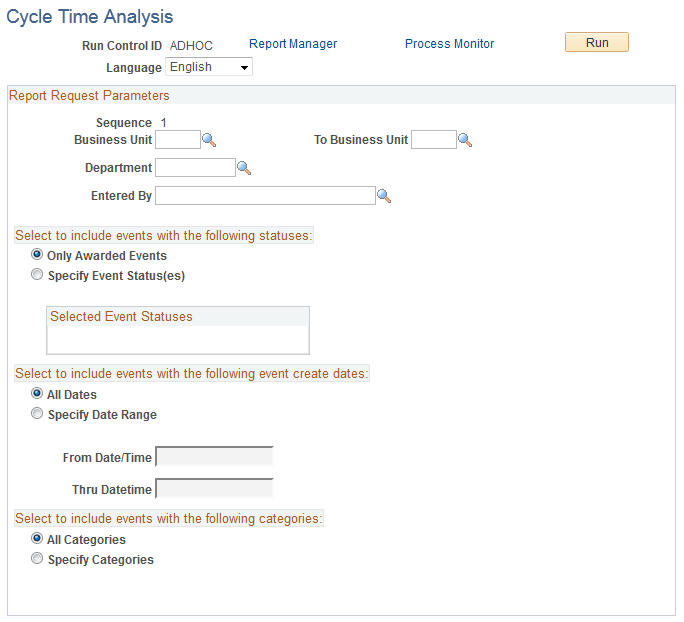
Report Request Parameters
| Field or Control | Description |
|---|---|
|
Business Unit |
Select a range of business units for the report. |
|
Department and Entered By |
Select values for these fields. |
Select to include events with the following statuses
| Field or Control | Description |
|---|---|
|
Only Awarded Events or Specify Event Status(es) |
Select one of these options. If you select Specify Event Status, the Select link appears. |
Select to include events with the following event create dates
| Field or Control | Description |
|---|---|
|
All Dates or Specify Date Range |
Select one of these options. |
|
From Date/Time and Thru Date/Time |
If you select All Dates, these fields are unavailable. If you select Specify Date Range, enter specific dates and times for event create dates to be included in the report. |
Select to include events with the following categories
| Field or Control | Description |
|---|---|
|
All Categories and Specify Categories |
Select one of these options. If you select Specify Categories, select an item or asset and a category code. |
Select Event Status Page
Use the Select Event Status page (AUC_SEL_EVT_STS) to select the specific event statuses to be included in the Cycle Time Analysis report.
Navigation:
Click the Select link on the Cycle Time Analysis page.
Select one or more of these statuses to be printed on the report:
-
Awarded
-
Open
-
Posted
-
Paused
-
Pending Post Approval
-
Pending Award
-
Inactive Version
Auction Summary Page
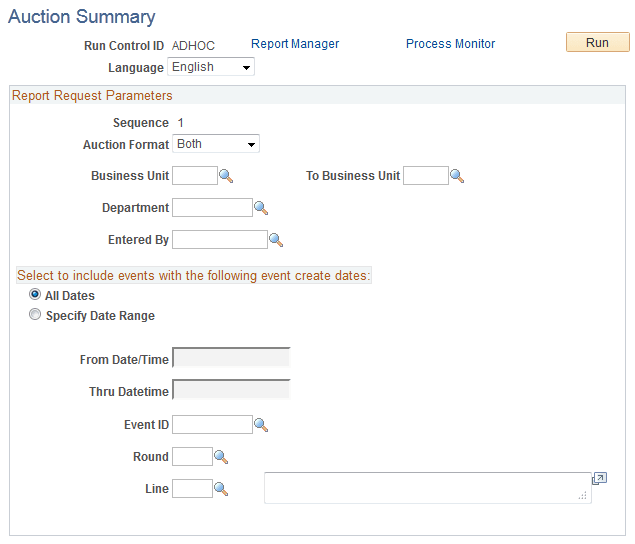
Use the Auction Summary page (AUC_SUMMARY_RPT) to generate the Auction Summary report (AUCSUMM), which contains changes in price, total cost, and score across bids for each bidder associated with auction events.
Navigation:
This example illustrates the fields and controls on the Auction Summary page.
| Field or Control | Description |
|---|---|
|
Auction Format |
Select the type of auctions you want included in the report. Values are Both, Buy, and Sell. |
|
Business Unit |
Select a range of business units for the report. |
|
Department |
(Optional) Select the department to further define the search criteria. |
|
Entered By |
(Optional) Select the name of the event creator. |
Select to include events with the following event create dates
| Field or Control | Description |
|---|---|
|
Event ID, Round, and Line |
Select values for these fields to be included in the report. |