Reviewing Bids
This topic discusses how to review bidder activity.
Pages Used to Review the Bid Activity of a Bidder
| Page Name | Definition Name | Usage |
|---|---|---|
|
Search Bidder Activity Page |
AUC_BID_ACT_SRCH |
Search for bidders' responses to events. |
|
AUC_BID_ACT_PG |
Review events that a bidder has been invited to, has bid on, and has been awarded. |
|
|
Create Bid Response Page |
AUC_RESP_BID_NUHD |
Review the details of a bid that the bidder entered. |
|
AUC_BID_ACT_PG |
Bidders use this page to view their own bidding activity. Bidders can access only the events to which they have been invited. |
Reviewing Bidder Activity
To review bidding on an event by a specific bidder:
-
Enter a business unit, bidder type, or ID on the Search Bid Activities page.
-
Access the Bid Activities page by clicking the name of the company whose bidding activity you want to review.
-
Click one of the categories in the Search Events group box to populate the Events group box with specific events.
You can view the number of events that a bidder was invited to or awarded or upon which the bidder bid. The system displays bids for the bidder across all sourcing business units.
-
In the Events group box, expand the event line to view the details of the invitation, bid, and award.
If the award is for a consolidated requisition, the system displays an award for each purchase order that is created to the awarded bidder.
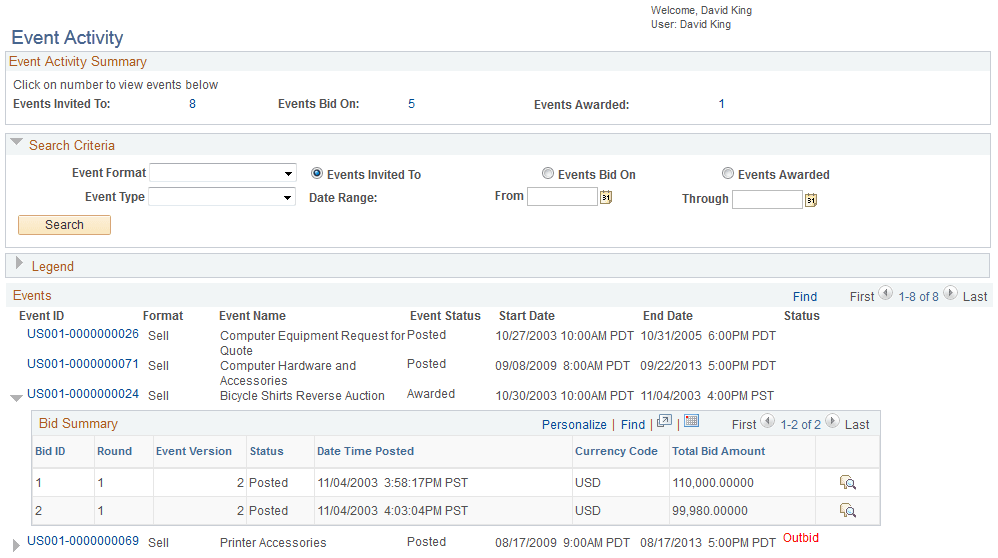
Bid Activities - Event Activity Page
Use the Bid Activities - Event Activity page (AUC_BID_ACT_PG) to review events that a bidder has been invited to, has bid on, and has been awarded.
Navigation:
Click a Bidder Name link on the Search Bidder Activity page.
This example illustrates the fields and controls on the Bid Activities - Event Activity page.
My Event Activity (External) Page
Use the My Event Activity (external) page (AUC_BID_ACT_PG) to view a bidder’s own bidding activity.
Bidders can access only the events to which they have been invited.
Navigation:
Bidders can use this page to view their own bidding activities. This page includes the same information for each bidder as the Bid Activities - Event Activity page, except that bidders can see only their own bids.
Bidders can view their event status and navigate to events by clicking the linked event ID.