Agreement Management
Agreement management enables you to monitor, update, and review header, line, and category agreements as well as their verification steps, statuses, and workflow notifications. You can assign agreement verification steps (deliverables) for internal and external parties. When using the steps externally, you can choose to have the supplier notified using e-mails that contain URLs. The URLs provide external parties access to the supplier facing portal so they can review and update deliverables online.
For additional information about URLs, see External Users and Document Collaboration and Understanding Contract Deliverable Verification Steps.
After assigning agreements to a contract, the Agreement Management feature can be used to indicate whether a verification step is in process, has been completed successfully, and whether the agreement met compliance requirements.
You can define agreements so that they are manually updated by users. In addition, Supplier Contract Management provides predefined metric-related agreement capabilities so that the system can calculate how the supplier is performing on a particular contract in terms of quality, on-time deliveries, and quantity performance for purchase orders related to the contract. The tracking of agreements is optional.
Note:
Agreement management does not include clause or document approvals, or collaboration that you might need to perform for the agreement document.
When agreements and associated verification steps are assigned to a contract, the system can send workflow notifications to interested parties when approaching a due date and when an action must be completed. This can include securing documents, getting confirmation of an agreed upon date, or completing necessary inspections. You can track the progress of each step using the Update Agreement Statuses component, which enables the owner of the verification step to indicate that verification is in process, has been completed, or has failed. After the verification steps have been completed, whether successfully or not, the contract administrator can indicate whether the supplier, or internal party, has met the terms of the agreement.
Agreement management also provides a quick and easy method to check agreement and verification step statuses. Using the Monitor Agreement Compliance component, you can see a summary view of selected contracts with designations for agreements that are, or are not, in compliance. A summary of the verification steps are displayed, along with their respective status of not started, in process, completed, or failed. From this summary view, you can drill into the details of the verification steps or agreements by selecting the link in the various status columns.
To view the agreement and verification step details of a single contract, use the Review Agreement Status inquiry. This inquiry is useful for those individuals who don't necessarily need to update statuses or monitor progress, but would like to view the details of agreements associated with a contract.
Contract agreement compliance is divided into two parts. The first involves predefining agreements, bid factor agreements, and assigning agreements to purchasing contracts. The second part is updating, monitoring, and analyzing compliance against agreements.
Example: Contract Agreement Process Flow
This diagram illustrates the process flow for contract agreements.
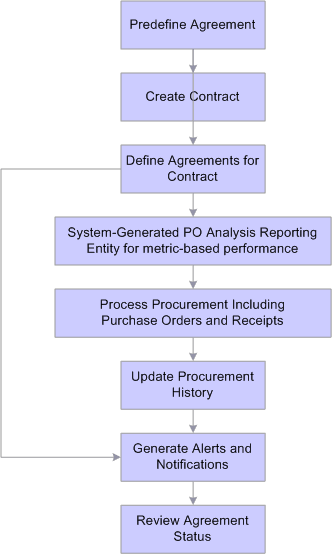
To create and use agreement compliance metrics, use these steps:
-
Create an agreement use the Contract Agreement Definition Page and using any result type.
-
Create a procurement contract using the PeopleSoft Source to Settle Common Information: Contract Entry - Contract Page.
-
Establish an agreement for the agreement code that you created in step 1, for the contract created in step 2 using the Contract Header Agreement Assignments Page.
-
If the agreement used in step 3 is metric based, auto numbering and a reporting entity must be established for it to be processed.
Set up auto-numbering and a reporting entity reference using the Supplier Performance Setup page (Set Up Financials/Supply Chain, Product Related, Procurement Options, Purchasing, Supplier Performance Setup).
-
Create purchase orders for the contract created in step 2, and receive the purchase orders.
-
Run the Procurement History Update process using the Update Procurement Info Page.
Make sure that you run the process from within Update Procurement Info component in Supplier Contract Management.
-
Run the Workflow Notification (CS_NOTIFY_WF) process as needed to generate e-mail and worklist notifications.
The system notifies interested parties defined in notifications when an supplier has an unacceptable performance or a warning performance against a contract agreement. Ensure that the Warning & Unacceptable Performance check box is selected on the Process Notifications page.
-
Access the Update Agreement Statuses Page to review the Cumulative Performance value.
This value provides an overview of the most up-to-date metric cumulative-performance percentages against this contract. The value is based on the current run of the Procurement History Update process for this contract.
Note:
Click the Cumulative Performance value to review supplier performance information. This link accesses the View Supplier Shipment Performance page. You use the page to compare actual performance against target performance. You can also navigate to item details and review receipt information.