Contract Amendments
A contract document amendment is an update to an existing executed contract document. Amendment processing occurs after you execute the original contract document. An amendment update can result from changes in source transactions or changes in contract terms in the document.
Document amendment capability is available for all documents when you are not using document types. When you are using document types, amendment capability is available for documents that use document types that have been selected to use Full Life Cycle Statuses on the Document Type page.
This diagram illustrates that you can create and complete amendment processing in the document life cycle:
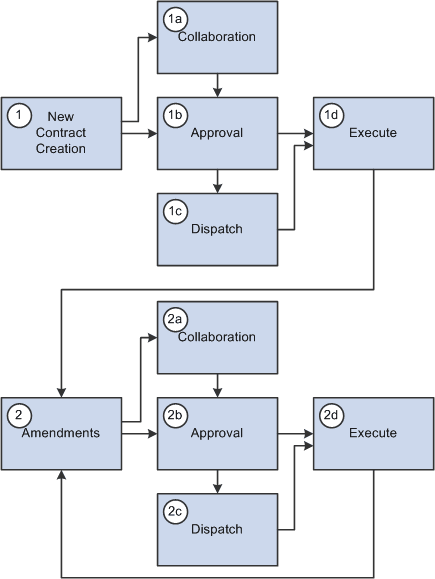
Supplier Contract Management provides life-cycle process tasks to support amendments and uses the same document life-cycle functions, such as collaborations, dispatch, change control, execution, and history tracking, during amendment processing. File processing and approvals are different in amendment processing than in the original document. The amendment approval process uses different criteria to select who should approve the original document. You can change the approval process by configuring the workflow process.
Supplier Contract Management provides three options for processing amendment updates. The system generates and manages document processing based on an amendment option. When you initially create an amendment, you can override the amendment option default value using the Amendment Option field on the Create an Amended Version page. After you select a process option, you cannot change the option for later amendment cycles. Amendment options are:
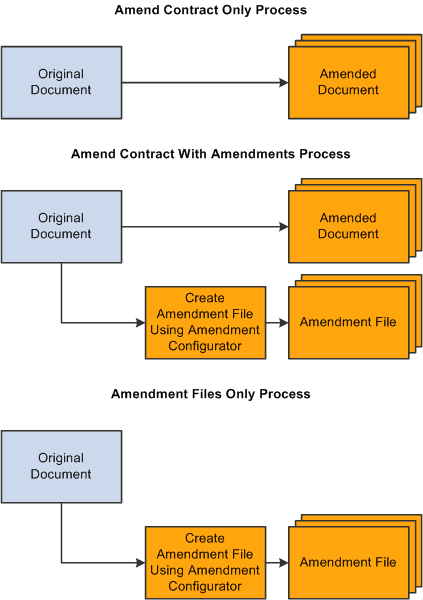
Amend Contract Only: This option supports a single-document process during which you can make changes to the original document that has been executed. The system makes a new copy of the executed document at the beginning of the amendment process.
Amend Contract with Amendments: This option supports a two-document process during which you can make changes to both the original executed document and a newly created amendment file. The system creates a new amendment file for each amendment cycle. When you create an amendment using Amend Contract with Amendments process option, the system provides View and Edit buttons for both the amended document and amendment file. This makes it possible to automatically update the amendment file using checked in changes that you made to the main document without having to check out the separate amendment file.
Amendment Files Only: This option supports a single-document process during which you can make changes to the a newly created amendment file. The system creates a new amendment file for each amendment cycle.
Note:
When you import documents using the Amend Contract with Amendments or Amendment Files Only options, and create a new separate amendment file for the document in the document authoring system, that amendment is a system-generated Microsoft Word .xml file format and requires that you define an amendment configurator.
Also, the import option you use to import an amended contract and amendment files remains as the process option for the contract. You cannot change the option when creating additional amendments within the document authoring system.
See Importing Documents.
This diagram illustrates all of the amendment processes that you can use to create an amendment:
Processing Contract Document Amendments
Processing amendment documents is similar to processing an original contract document. The system processes functions such as viewing and editing documents, collaboration, approval, and comparisons for amendment files in the same manner as it does for the original document. The amendment processing option controls which files and the number of files the system processes.
When you are using the Amend Contract with Amendments process option, the system provides separate View and Edit buttons for both the amended document and amendment file. This makes it possible to automatically update the amendment file using updates that you made to the amended document.
Related Topics