Contract Library
The PeopleSoft Supplier Contract Management document library is an authoring system that enables you to create, track, and reuse a variety of document elements. The contract library contains reusable components for the authoring system. When using the library, you can create reusable rules, clauses, and section elements. These elements are the building blocks of a document configurator, which can be used to generate a Microsoft Word document. Similar to clauses, sections, and rules, you can reuse document configurators. Documents that result from a configurator can have different structures based on the data that they contain.
The contract library and document management system combine transaction information, such as purchase order lines, with a document that is generated in PeopleSoft Supplier Contract Management. The system formats the document, inserts the appropriate contractual and legal wording for the given situation and agreements, and manages the approvals and execution of the contract.
Establishing document types in the contract library enables you to define criteria for creating a certain type of document. Document types help authors and clause librarians find the right document to meet their requirements. When you set up document types, you define settings, default values, and security for the document.
The contract library also provides a complete set of searchable contract elements. Among the types of searches that you can perform within PeopleSoft Supplier Contract Management are searches for clauses, sections, rules, document types, and bind variables. You can also search for document configurators and documents, and perform full-text and object-specific searches, such as class names, group names for clauses, and generated documents. This search capability enables you to combine searches for certain transactional data along with document search criteria, such as contract amount and item category. After completing a search, you can review the results and then select a value from the list of results that meets the search criteria.
This diagram illustrates how the system processes transactional or ad hoc contracts using the elements of the contract library. It illustrates how documents are generated and how a document enters its life cycle:
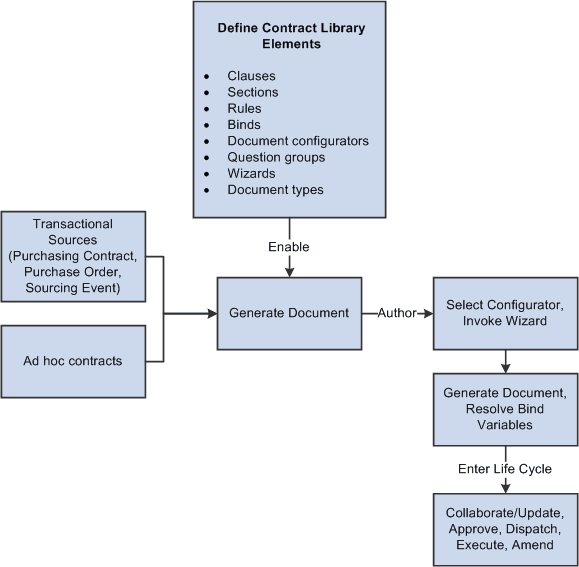
The document authoring system uses the elements listed in the Define Contract Library Elements box to generate a document. After the Microsoft Word document is available, you can perform authoring tasks and then place the document into its life cycle.
For additional information about each element of the Contract Library, see:
When setting up contract library elements and then testing authored documents, you can use PeopleTools Application Data Sets (ADS) to move data between a development environment, a test environment, and a production environment. For more information, see Application Fundamentals: Understanding the PeopleSoft Data Migration Workbench and Using the Supplier Contract Workbench.