Dispatch, Comparison, Render, and Prepare Error Resolution
You can receive various errors when dispatching a Microsoft Word .doc file or when performing a server-side comparison between Microsoft Word files. For functions such as dispatching a .doc file or comparing files, the system calls an internal application message using a Microsoft Windows application server and the Microsoft Word version that reside on the Microsoft Windows server.
See Setting Up Document Comparison and Rendering.
These error message conditions can occur when various dispatch and comparison items are not setup correctly:
This screen shot shows an example of the message that would appear if the application server URL is not set up properly on the installation page, but the gateway is set up properly.
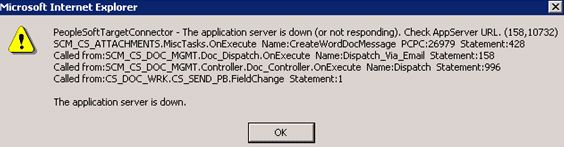
To resolve the message, update the URL entry on the Installation Options page to be //<app server machine>:<JSL Port>.
The gateway and application server are on the same version, but the application server doesn't have the publication or subscription set to On.
This condition is okay. The application sever used for the compare and render functions doesn't have to have either publication or subscription set to On.
This message appears when there is not a .dll file on the application server (csdocutil):

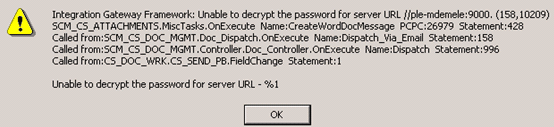
This message appears if you did not enter a default value or user ID and password on the configuration setting for the gateway properties:
This message appears when the integration gateway is on version X while the application server defined on the Installation Options page is on Y.
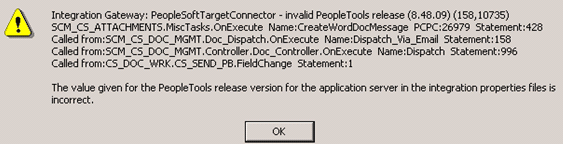
To verify the server PeopleSoft PeopleTools version:
-
Select:
The Gateways page appears.
-
Click the Ping Gateway button.
The PeopleSoft Integration Gateway page appears with the PeopleTools version. Make note of the version.
-
Open the Gateways page again.
-
Click the Gateway Setup Properties link.
The Configuration page appears.
-
Make sure that the PeopleTools release version listed in the top portion of the page and in the grid is the same as the one that appeared when you clicked the Ping Gateway button.
-
Verify that the Microsoft Windows application server defined in the Compare/Render Server/Path field on the Installation Options page is the same one as defined for the version of PeopleTools.