Question Navigation
A question group navigational feature provides the capability for the system to navigate or branch from question to question, within a question group, based on the user's response to a question. Branching enables you to:
-
Navigate from question to question based on the user's selection of a value from a list of predefined or valid values and navigation options.
-
Navigate from question to question based on the user-entered value.
Navigation options are:
-
Next Group: Upon question response, navigate to next question group.
-
Next Question: Upon question response, navigate to next question.
This is the question with the next higher sequence number.
-
Specific Sequence: Upon question response, navigate to the specified sequence number.
The question sequence number must be higher than the current question sequence number and the question must be defined.
-
Specific Configurator: Upon question response, use the specified configurator to create the document.
This option is available when you are creating a question group for use with a configurator selection wizard. When you select the option, the system displays a Configurator ID field where you can select the appropriate configurator based on the valid value and the response to the question.
Navigation using wizard bind variable data types of date, date and time, and decimal do not support the entry of a values and navigation for the wizard bind variable value. The system disables several fields on the Valid Values and Navigation page, but still provides basic navigation options to go to the next question, the next question group, or a specific sequence.
Navigation using wizard bind variable data types of integer, string, and yes/no, and check box can use values and navigation. The Valid Values and Navigation page provides entry of the valid values, description, and navigation type for each value entered for the wizard bind variable. The yes/no data type has predefined values of Y and N and predefined descriptions of Yes and No.
When you define or modify questions with yes and no bind types or do not use a bind value, the system provides you a way to define navigation for both yes and no responses. The system displays the Valid Values and Description fields that are predefined for this bind type. You can also define navigational values. The next examples illustrate the yes and no bind type navigation:
This example illustrates the fields and controls on the Yes/No question group page example. You can find definitions for the fields and controls later on this page.
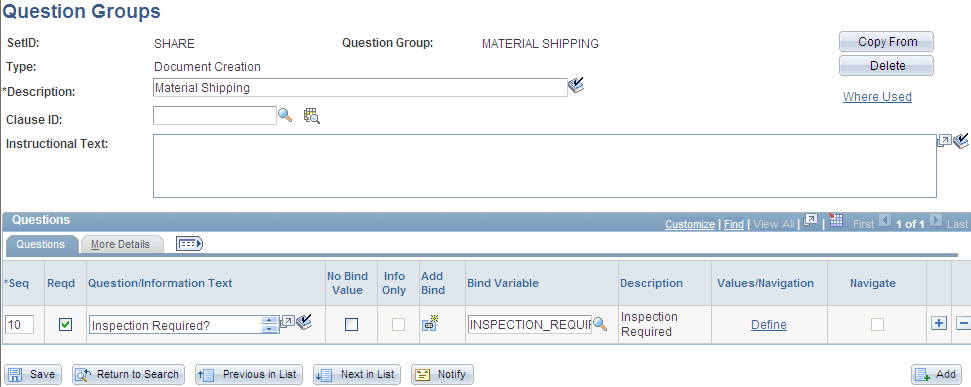
After you define a yes and no bind type for a question group, you click the Define link to update the navigation for the question as shown in the next example:
This example illustrates the fields and controls on the Yes/No question group navigation example. You can find definitions for the fields and controls later on this page.
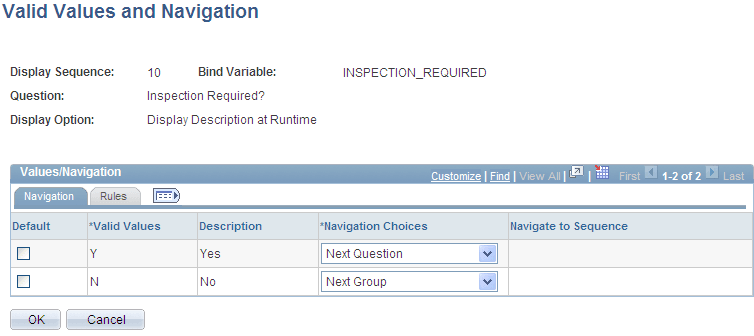
Using this page, you can define how the system should navigate depending on the answer to the question. So in the previous example, if the document author selects Yes when answering the inspection required question, the system goes to the next question. If the author selects No when answering the question, the system navigates to the next question group.
The system also makes it possible to use question group navigation based on a list of values and navigation. The value that you select determines the specific question to which the system navigates. For example, string and integer bind types enable you to create values and navigation from which the document author can select a response. An example of this type of navigation might be when a contract includes different types of material handling. The contract requires different clauses for each method of shipping material. Using values and navigation, you can define questions and question navigation for each of the material shipping methods. You can create values at any point while defining the question group.
This example illustrates how you might create a question group for shipping materials using valid values and navigation:
This example illustrates the fields and controls on the Valid values and navigation question group example. You can find definitions for the fields and controls later on this page.
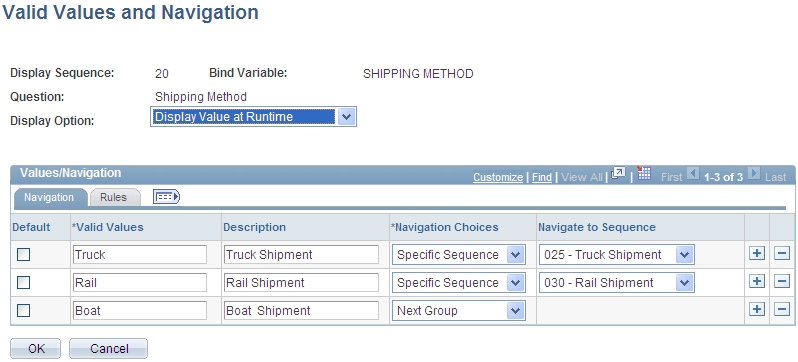
The purpose of a value list is to enable the document author to have the flexibility to address multiple situations in a document. In the previous example, the author's organization ships material using three methods: truck, rail, and boat. When setting up the question group, you initially provide the author with the choices for the method of shipping on which the contract is based. Then, setting up the navigation, you establish a sequence of questions for the shipping method you select.
Note:
The blank value at the top of a drop down list is not considered a valid value and no navigation occurs if this value is chosen. Always select a valid value from a drop down list to ensure appropriate question display.
Note:
You can select an integer or string bind type, a yes or no type, or a check-box bind type on the Question Group page to enter value lists for a question.
The instructions indicate that authors use the question group to create contracts that include material shipments. The first question asks for the method of shipping. A field is available for selecting the method. Navigational details display all the values that are available to answer the question. In the previous example, if you select the TRUCK value, the system navigates you to specific question sequence 025, which might begin a series of questions about vehicle weights, safety standards, and so on.
After you define the wizard, the wizard test mode provides a method to test the question logic without generating the document. You click the Test Mode button on the Wizard Definition page to test the wizard. This example illustrates how the system presents questions about material shipments in the wizard test mode:
This example illustrates how the system presents questions about material shipments in the wizard test mode:
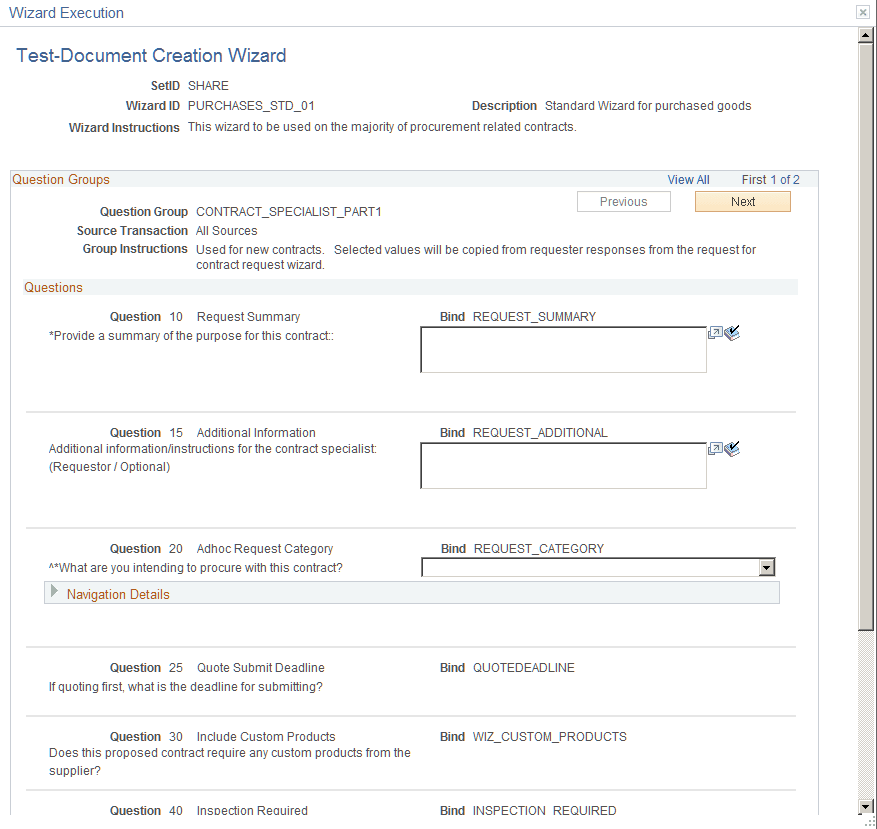
You can define navigation for each value using the same navigation options that are available for all bind types. So, for example, you might have a different question group that deals only with chemical material questions, so you could skip to that question group to include clauses in the document for shipping these types of materials.