Supplier Contract Workbench Page (Adhoc Documents)
Use the Contract Workbench page (Adhoc Documents) to search for and manage actions for ad hoc documents.
Navigation:
This example illustrates the fields and controls on the Supplier Contract Workbench page (Adhoc Documents).
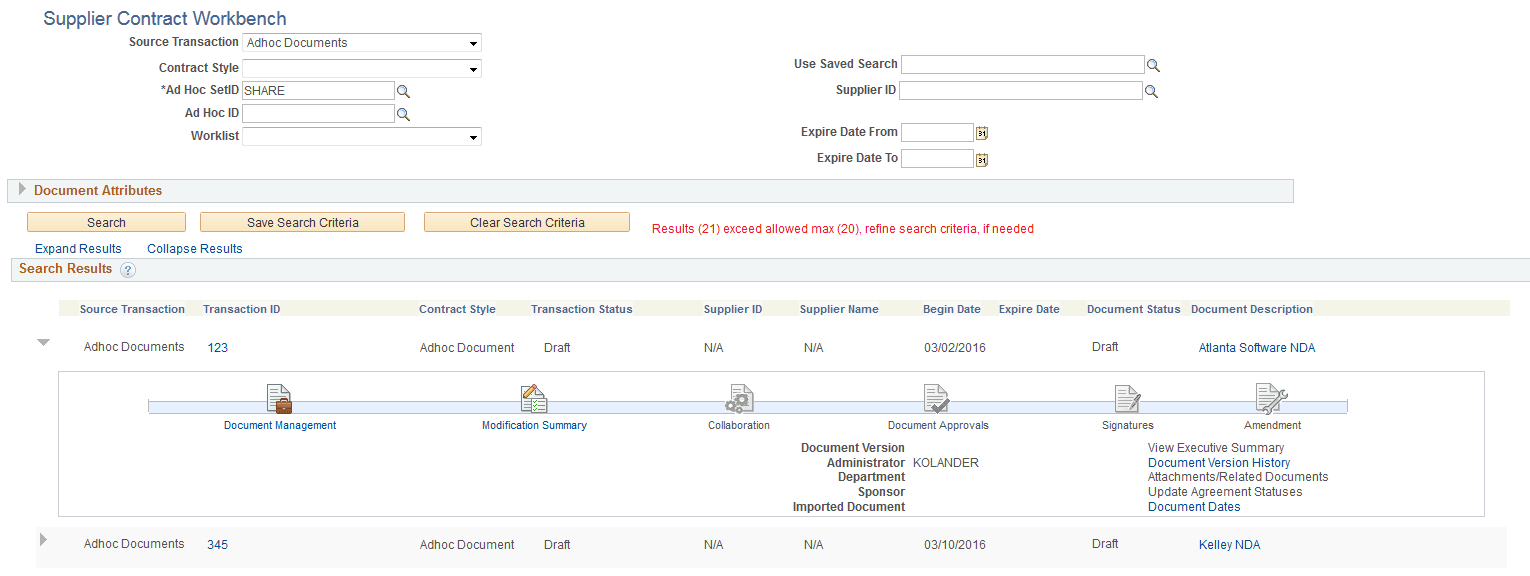
Header Search Fields
| Field or Control | Description |
|---|---|
|
Ad Hoc ID |
This field is the Ad Hoc Document ID and is only used to search across ad hoc documents. |
|
Worklist |
Select one of these Worklist options when Ad Hoc is selected in the Source Transaction field:
|
|
Supplier ID |
Select a supplier ID to search for adhoc documents associated with that supplier. |
Document Attributes Section
When Ad Hoc is selected in the Source Transaction field, this section includes four additional search fields:
-
Last Modified Date (From and To)
-
Begin Date (From and To)
Search Results
| Field or Control | Description |
|---|---|
|
Transaction ID |
Click to access the Document Management page. |
|
Contract Style |
Displays the contract style for the authored document. |
|
(Document Description) |
Click to access the authored document. |
|
Begin Date and Expire Date |
Displays the begin date and the expire date from the authored document. |