Applying Freight Charges to the Order Level
Once freight charges have been received and applied to the delivery level (in the Freight Amount field of the IN_DELIVERY_FRT table), PeopleSoft immediately allocates the freight charges to each sales order within the delivery. The allocated amounts are stored in the IN_DELIVERY_ORD table by a combination of delivery ID and sales order number. The IN_DELIVERY_ORD table also stores any overrides at the sales order level and any manually entered miscellaneous shipping charges entered in the Shipping/Issues component in PeopleSoft Inventory. If the freight amount for the delivery is recalculated or changed, the system reallocates the freight to the sales order level.
The Freight Charge Method field on the delivery determines how freight charges are allocated to the sales order. All demand lines on the delivery must have the same freight charge method. The Freight Charge Method is a required delivery key for building a delivery. The Freight Charge Method field has four options:
-
Order Quantity: Allocate freight charges based on the item quantity within each demand line.
-
Order Value: Allocate freight charges based on the total price within each demand line. This option is only available when you calculate freight on the quote or sales order using the internal PeopleSoft calculator. Be sure to run the Order Completion (OM_BACKGRND) process to calculate prices before calculating freight.
-
Volume: Allocate freight charges based on the shipping volume within each demand line.
-
Weight: Allocate freight charges based on the shipping weight within each demand line. This option is the only option available if you are using the freight amount from the Fulfillment Workbench, the Shipping Requests process page, the Front End Shipping Requests process page, or the shipping EIP transactions.
For sales order entry defaulting, the Freight Charge Method can be defined within the default hierarchy on the Order Groups page, the customer's General Information - Sold To Options page, and the Buying Agreement Form-Header Terms page. In the default hierarchy, the more specific information overrides the more general information; in this case, a freight charge method defined on a buying agreement overrides a freight charge method on a customer and a freight charge method on the customer would override a freight charge method on the order group. The freight charge method value that is supplied by default to the sales order schedule line can be overridden manually by means of the Order Entry Form-Shipment Schedules: Ship Options 2 page. The freight charge method value on the order schedules lines flows to the delivery ID created for the lines.
Example of Freight Charge Allocation from the Delivery Level to the Sales Order Level
This example reviews the application of freight charges to the sales order level.
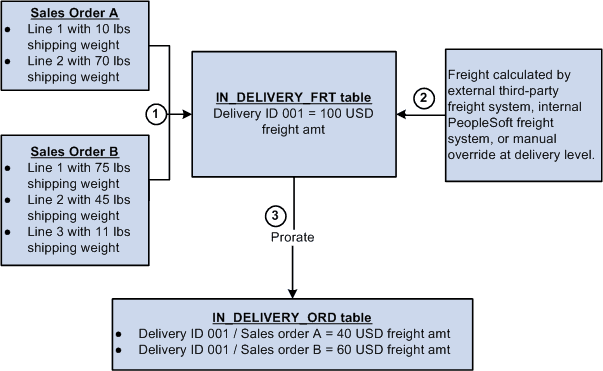
The following diagram illustrates the process flow for creating a delivery, calculating the freight charge at the delivery level, and prorating the freight charge to the sales order level.
The freight charge is prorated to the sales order as follows:
-
Sales order A and sales order B are entered into the system. The Order Completion process runs in the background and assigns lines 1 and 2 of each sales order to delivery ID 001. The third line of sales order B is to be shipped from another warehouse (different PeopleSoft Inventory business unit) and cannot be on the same delivery as the rest of the order.
-
Freight is calculated for delivery ID 001. Freight can come from the external freight system, the internal PeopleSoft freight calculator, or be an override value that was manually entered. The freight charge of 100.00 USD is stored in the IN_DELIVERY_FRT table.
-
The freight charge is prorated to the sales order level using the option of Weight in the Freight Charge Method field. The shipping weight for each demand line within the delivery is totaled. The combined shipping weight is 200 pounds as follows:
Sales Order Line Number, Schedule Line, Demand Line Shipping Weight A
1/1/1
10 LBS
A
2/1/1
70 LBS
B
1/1/1
75 LBS
B
2/1/1
45 LBS
The shipping weight for sales order A is 80 LBS (10 + 70) and the shipping weight for sales order B is 120 LBS (75 + 45). The freight charge of 100 USD is prorated as 40% to sales order A (80 / 200) and 60% to sales order B (120 / 200).
In the IN_DELIVERY_ORD table, 40 USD (40% of 100) is recorded for delivery ID 001 and sales order A. 60 USD (60% of 100) is recorded for delivery ID 001 and sales order B.
Manual Overrides and Prorating Freight Charges to the Sales Order
Freight charges can be manually overridden at the delivery or sales order level. When allocating the freight charge to the sales order level, the following rules apply:
-
An override at the delivery level is prorated to the sales order level using the Freight Charge Method field on the delivery. This process is the same as if the freight charge was calculated by the internal or external freight systems.
-
An override at the sales order level remains the same. Freight can still be calculated at the delivery-level and any remaining sales orders within the same delivery are assigned their prorated share of the delivery-level freight amount. In this case, the delivery-level freight amount and the sum of the order-level freight amounts will not equal.
For example, you have one delivery containing two orders (order number 1 and 2). You enter an override freight amount of 10 USD on order number 1 and then send the delivery out to the third-party freight system. The third-party system returns a freight amount for the entire delivery of 100 USD, Assume that without the override, the system would prorate the delivery-level freight amount at 50 percent for each order. However, with the override freight amount of 10 USD on order number 1, the system only applied the prorated freight amount to order number 2. Therefore, order number 1 has the freight amount of 10 USD and order number 2 has the freight amount of 50 USD (half of 100 USD). When the orders are sent to PeopleSoft Billing and PeopleSoft Cost Management, 10 USD and 50 USD are used for costing and billing, totaling 60 USD not 100 USD.
-
On many pages, if freight has already been calculated, then the Freight Amount field can be used to apply an increase or decrease to the freight charge, instead of an override. The system calculates freight charges at the delivery-level, prorates the amount to the sales order level, and then the manual entry in the Freight Amount field is added or subtracted from the sales order freight charge.