Receiving Freight Charges
Freight charges can be passed from an external third-party freight system or calculated by the internal PeopleSoft freight calculator. In both cases, the freight charges are stored at the delivery level in PeopleSoft and then allocated to the sales orders within the delivery. In this section, how the freight charges are received and added to the delivery ID is discussed. In addition, how manual overrides at the delivery or order level are applied is also discussed.
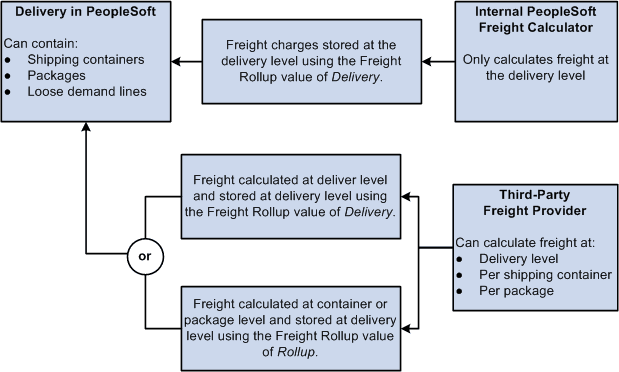
The following diagram illustrations the receipt of freight amounts from an external third-party freight system or from the internal PeopleSoft freight calculator:
| Field or Control | Description |
|---|---|
|
Internal PeopleSoft Freight Calculator |
The internal PeopleSoft freight calculator always returns freight at the delivery level. |
|
External Freight System |
The external third-party freight systems could return freight at both the delivery level and the package and shipping container level. |
|
Freight Rollup field |
The Freight Rollup field determines which freight charges are picked up and applied to the delivery in the Freight Amount field of the IN_DELIVERY_FRT table. The options are:
You can manually set the Freight Rollup field on the Delivery Management Workbench, the Fulfillment Requests process page, or the incoming transaction request using EIPs. |
|
Delivery in PeopleSoft |
Based on the value in the Freight Rollup field on the delivery, the freight amount is determined and then stored at the delivery level.
|
When you initiate freight calculation (internal or external) from the PeopleSoft Order Management pages or process pages, the system always uses Delivery option for the Freight Rollup field.
For informational purposes, the Freight Audit fields store the freight amounts received from the third-party system regardless of the Freight Rollup field. The Freight Audit fields are not used for billing or costing. The Freight Audit Amount field (FRT_CHRG_AUDIT) on the delivery, on the shipping container, or on the package are used to record any freight amounts coming from the third-party system. These values can be used for reporting or research.
Manual Overrides With the Freight Rollup Field
The following rules apply if you manually override the freight amount on a delivery, order, shipping container, or package:
-
A freight amount override at the shipping container or package level is only applied if the Freight Rollup field has the value of Rollup on the delivery. If the Freight Rollup field has a value of Delivery then your override amounts at the shipping container or package level are stored in information-only fields; the overrides are not used.
-
A freight amount override at the delivery level is always applied regardless of the value in the Freight Rollup field (Rollup or Delivery). The freight amounts returned from the third-party freight provider are stored in the Freight Audit Amount field (FRT_CHRG_AUDIT) on the delivery but the override amount is used for billing and costing.