Delivery Management Workbench- Packages Page
Use the Delivery Management Workbench- Packages page (IN_DLV_PACKAGES_SP) to view existing packages that are part of a delivery or enter new packages.
Navigation:
Click the Maintain Packages link on the Delivery Management Workbench-Manage Delivery page.
This example illustrates the fields and controls on the The Delivery Management Workbench- Packages page. You can find definitions for the fields and controls later on this page.
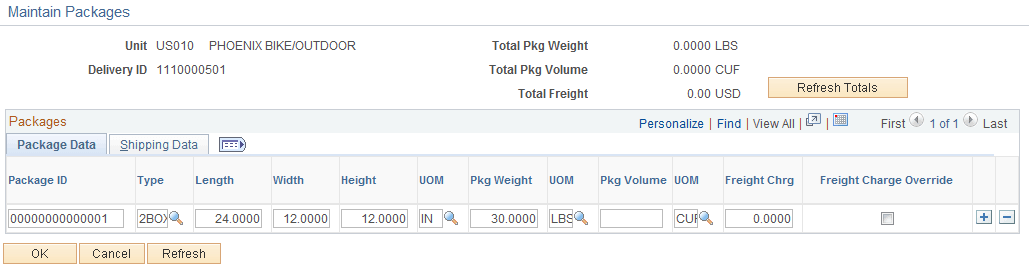
The Packages page enables you to view existing packages that are part of a delivery or enter new packages. This page is accessed from the Manage Delivery page. Packages are defined either manually by the user or can be returned from the third-party freight provider. If one or more packages is assigned to a delivery, it is assumed that all loose demand for the delivery is in one of the assigned packages.
| Field or Control | Description |
|---|---|
|
Refresh Totals |
Click this button to recalculate the following fields: Total Package Weight, Total Package Volume, and Total Freight. |
Package Data tab
| Field or Control | Description |
|---|---|
|
Type |
(optional) Enter a container type (Inventory, Maintain Containers, Container Types) to populate the dimensions of this package based on the shipping parameters of the container type. |
|
Freight Chrg(freight charge) |
View or override the current freight amount assigned to this package. |
|
Freight Charge Override |
Select this check box to use the value entered in the Freight Chrg field as an override. The freight routines do not change your override freight amount. Note: The inbound EIP transactions do not update your freight amount when this check box is selected. |
|
Freight Charge Override |
Select this check box to use the value entered in the Freight Amount field as an override. The freight routines do not change your override freight amount. Note: The inbound EIP transactions do not update your freight amount when this check box is selected. |
Shipping Data tab
| Field or Control | Description |
|---|---|
|
Comm Ship Date(committed shipment date) |
Displays the committed shipment date returned by the third-party freight system. |
|
Comm Arrv Date(committed arrival date) |
Displays the committed arrival date returned by the third-party freight system. |
|
Freight Ref Num(freight reference number) |
Enter data in this free form reference field. If a freight reference number is returned on the freight response then it is stored in this field at the package level. |
|
Tracking Number |
Displays the tracking number for this package. |
Package Label tab
| Field or Control | Description |
|---|---|
|
Link to Package Label |
Click this link to access the third-party website where you can view and print the packing label for this package. |