Delivery Management Workbench- Demand / Container Selection Page
Use the Delivery Management Workbench- Demand / Container Selection page (IN_DLV_DMDSRCH_SP) to enter search criteria, search, and select demand lines and shipping containers that you want to display in the Unassigned to Delivery group box of the Delivery Management Workbench-Manage Delivery page.
These demand lines and shipping containers can be added to an existing or new delivery.
Navigation:
Select the Get Demand Lines / Containers link on the Delivery Management Workbench-Manage Delivery page.
This example illustrates the fields and controls on the The Delivery Management Workbench- Demand / Container Selection page .
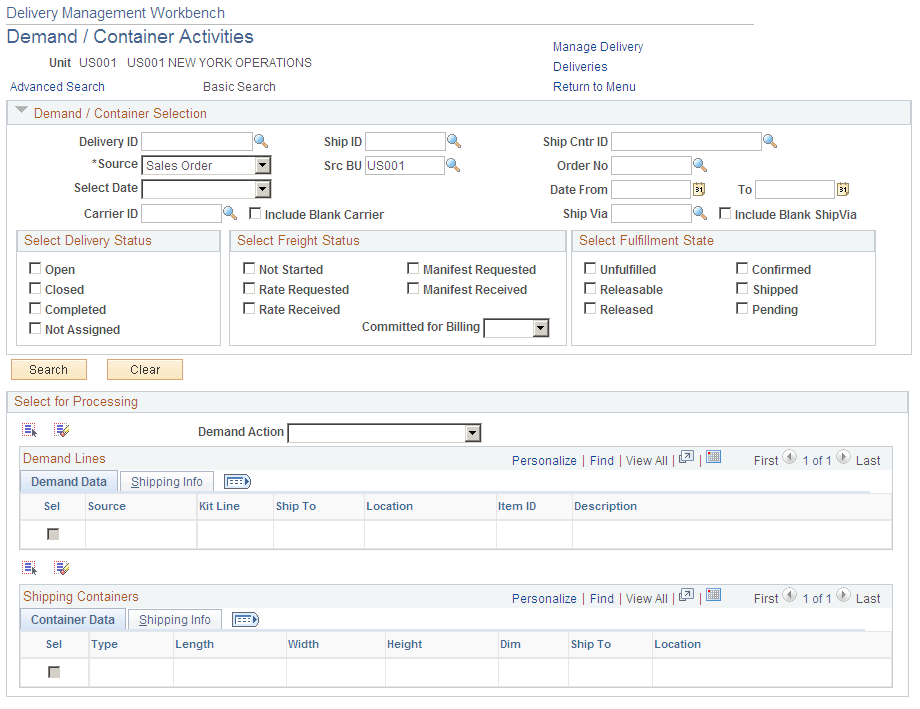
Enter search criteria for demand lines and shipping containers that you want to display in the Unassigned to Delivery group box of the Delivery Management Workbench-Manage Delivery page. These demand lines and shipping containers can be added to an existing or new delivery.
For a complete list of the search criteria field definitions, see the Common Elements Used in This Section within the Using the Delivery Management Workbench section.