Example 3: Specific Carrier at Order Entry Time
A user, such as a CSR, can enter a sales order in PeopleSoft Order Management and then request freight charges from the external third-party freight system. The third-party system responds immediately giving the CSR the freight charges.
Note:
This example assumes that the PeopleSoft system and the third-party freight provider have been properly set up to accomplish this method of freight calculation.
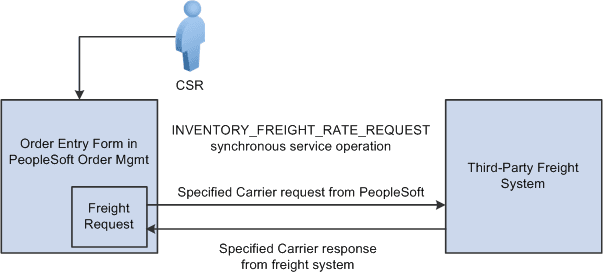
The following diagram illustrates the business process flow of a specified carrier integration using the PeopleSoft external third-party freight feature.
-
The CSR answers the phone and takes the customer's order. The sales order is entered directly into the Order Entry Form component while the customer is on the phone. The preferred carrier check box and carrier ID are provided by default to the sales order based on the Order Management default hierarchy (Order Groups page, the customer's General Information - Ship To Options page, and the Buying Agreement Form-Header Terms page). The CSR saves the component and one or more delivery IDs are automatically created with the specific carrier ID assigned to the deliveries. The demand lines are also saved with the preferred carrier flag set to yes to indicate to users downstream in the fulfillment process that the carrier ID on the demand and the assigned deliveries has been explicitly assigned.
-
The CSR requests freight charges on the Order Entry Form component. The freight request page appears, where the CSR can select the Use Specified Carrier option to request freight only for that carrier. The CSR can then select Preview Freight to first review the single freight option or Process Freight with Post-Ship Actions to assign the single freight option. The request is sent to the third-party freight provider by means of the PeopleSoft Integration Broker. The Integration Broker uses a synchronous service operation to send out the deliveries to the third-party freight provider. The deliveries created for the sales order are sent out on the freight request transaction
-
The third-party freight provider responds to the transaction request and returns only one freight choice per delivery ID based on the carrier specified for the delivery.
-
The CSR can optionally view the delivery IDs and the assigned carrier, scheduled ship date, and freight amount for the sales order. The CSR can elect to search from freight again using expanded search options to include other shipping methods and other carriers.
-
When the freight choices are assigned to the deliveries, the appropriate carrier is assigned to the sales order demand and schedule line and the communicated ship date from the third-party response is used to set the scheduled ship date on the demand and sales order schedules associated with the deliveries.
Note:
In examples 1 through 3, another alternative is to perform freight rate shopping from the Delivery Management Workbench in PeopleSoft Inventory rather than the Order Entry Form in PeopleSoft Order Management. By using the Delivery Management Workbench, you can perform the same interactive freight request methods (rate shopping, best way, or specific carrier). The workbench enables you to perform carrier assignments and get estimated freight amounts at any time before shipping. The main difference between using the Order Entry Form and the Delivery Management Workbench is that the Order Entry Form stores the freight amount within the Order Management freight amount field whereas the workbench stores the freight amount within the Inventory freight amount field. If your setup uses the value of OrderEntry for the Freight Bill Type field, then the Order Entry Form must be used to correctly record the freight amount within the Order Management freight amount field.