Example 4: Batch Assignment of Freight Charges on Incoming EDI Sales Orders
A customer sends sales orders using electronic data interchange (EDI). The sales orders are picked up and processed by the Order Completion process. Deliveries are created. Carrier assignments and estimated freight charges are assigned automatically and saved with the order.
Note:
This example assumes that the PeopleSoft system and the third-party freight provider have been properly set up to accomplish this method of freight calculation.
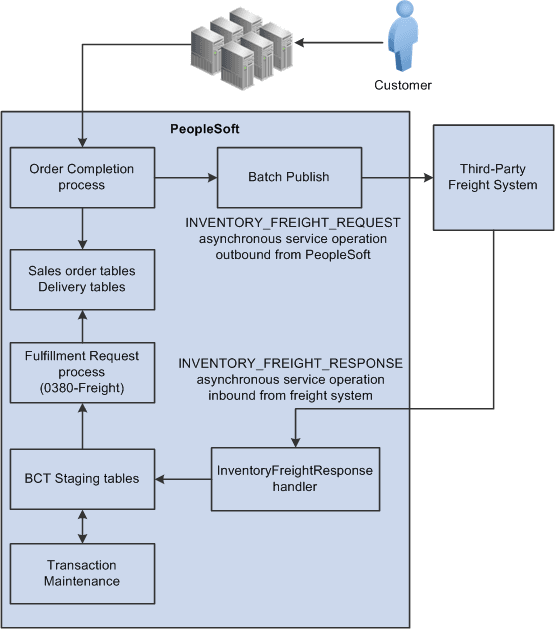
The following diagram illustrates the business process flow of freight charges for a batch of EDI sales orders using the PeopleSoft external third-party freight feature.
-
The customer sends sales orders using EDI.
-
Your EDI coordinator has defined the run control that picks up the sales orders and processes them through the Order Completion process. The process completes several steps. The freight-specific steps include:
-
Assembling the sales order lines into deliveries. The delivery structure that goes out on the freight request transaction is also stored in the PeopleSoft system.
-
An asynchronous message (INVENTORY_FREIGHT_REQUEST) is sent out to the third-party freight provider. The asynchronous method allows the Order Completion process to complete processing without waiting for the reply from the third-party freight system.
-
The Freight Status field on the IN_DELIVERY table is changed to Rate Requested for the impacted delivery IDs. This status prevents further processing on the deliveries until a response is received from the external third-party freight system and freight charges are applied to the deliveries and the order.
-
-
The Batch Publisher process publishes the deliveries from the Order Completion process.
-
Later, the third-party freight system sends an asynchronous rate-results transaction that provides the resulting freight charges for the delivery IDs associated with the sales order lines.
-
The PeopleSoft Integration Broker receives the inbound XML message into the INVENTORY_FREIGHT_RESPONSE queue. The InventoryFreightResponse handler, a PeopleTools application class, formats the incoming data and populates the BCT staging tables. For each transaction request, the InventoryFreightResponse handler assigns a unique ID called the EIP_CTL_ID.
-
The Fulfillment Requests process (IN_FUL_BCT) using the 0380 transaction code (Freight) retrieves the transaction requests from the staging tables, processes them, and applies them to the PeopleSoft production tables. The deliveries for the sales orders are updated with the appropriate carrier and freight charges. Once the rate-results transaction has been processed in the PeopleSoft system, the Freight Status field on the IN_DELIVERY table is changed to Rate Received for the impacted delivery IDs.
-
If the transaction requests are not processed successfully, they are given an error status, and the appropriate error message is provided. The Maintain Transactions component enables you to view and correct requests that contain errors. Once corrected, you can relaunch the Fulfillment Requests process. This is an optional step, you can choose to have the request errors canceled automatically, and then you could create another request.
-
The sales orders continue through the order fulfillment process.