Example 5: Interactive Freight Calculation at Shipping Time
A user, such as a CSR, can enter a sales order in PeopleSoft Order Management. When the order is saved, the demand for the order lines is added to new or existing delivery IDs. The user can calculate order entry freight as described in the example above. Estimated order entry freight is maintained independently of the estimated shipping freight amount. The sales order is processed through Inventory order fulfillment, which could include removing backordered lines from the delivery ID and other changes in shipping fields. At the shipping stage, the transaction request for freight charges is sent to the external third-party freight system. The third-party system responds with the freight charges, and the freight amounts are applied to the deliveries and their associated sales orders.
Note:
This example assumes that the PeopleSoft system and the third-party freight provider have been properly set up to accomplish this method of freight calculation.
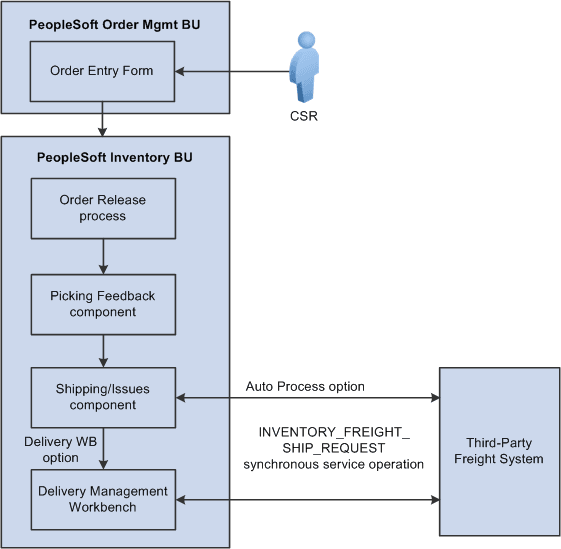
The following diagram illustrates the business process flow of interactive freight calculation at shipping time.
-
The CSR answers the phone and takes the customer's order. The CSR enters a sales order in PeopleSoft Order Management and saves the order. When the order is saved, the demand for the order lines is added to new or existing delivery IDs. In addition, assuming the Order Management business unit is configured appropriately, when the order is saved, it is automatically reserved and moved to a releasable fulfillment state.
-
The warehouse control manager runs the Order Release process and prints pick tickets for orders. The demand is set to the released fulfillment state and is ready to be picked.
-
The warehouse picker picks the order, enters picking feedback information into the Picking Feedback component, and advances the order to a confirmed fulfillment state. The items are moved to the shipping area.
-
The shipping clerk verifies that the order is ready for shipping and records the shipment in the Shipping/Issues component. When saving the shipment in the Shipping/Issues component, the system uses the value in the Validate Delivery field to validate the delivery to verify that all the demand for the delivery have shipped. Using the Validate Delivery field, the shipping clerk can tell the system to automatically reassign demand that is not yet ready to ship to other existing or new deliveries. On the Shipping/Issues component, the shipping clerk has two options to freight and manifest the deliveries:
-
The shipping clerk can choose the Auto Process option on the Freight Option field and then save the Shipping/Issues page to automatically perform a best way manifest option if a freight service definition does not currently exist on the delivery. If the delivery contains a freight service definition, then the delivery is manifested using that freight service definition.
-
The shipping clerk can choose the Delivery Workbench option on the Freight Option field and then save the Shipping/Issues page to access the Delivery Management Workbench where he can perform freight and manifesting. The Delivery Management Workbench can be used to view and manipulate the deliveries and request freight from the third-party system. Using the workbench, the shipping clerk can request rate shopping, best way, or specific carrier. In addition, the Delivery Management Workbench enables the shipping clerk to request that the third-party system assign the shipped items to a shipping manifest and return the shipping label URL references and tracking numbers to the PeopleSoft system.
-
-
In the third-party freight system:
-
The freight charges are calculated and sent to the PeopleSoft system.
-
The sales order can be added to the appropriate freight supplier’s manifest.
-
Appropriate shipping labels can be printed and physically attached to the shipping container or package.
-
Tracking numbers are assigned and returned with the shipment response message to the PeopleSoft system. Tracking numbers are returned and maintained optionally at the delivery, shipping container, or package level. Label URL references can also be returned and maintained at the shipping container level and package level.
-
Based on your setup, specialized shipping documents, such as bill of ladings and export documentations, can be printed from the third-party system.
-
-
The freight charges, shipping labels, and tracking numbers are received into the PeopleSoft system. The delivery structure that goes out on the freight request transaction is also stored in the PeopleSoft system. As freight rates are returned they are maintained at the order, delivery, package, and shipping container level. The shipping labels can be printed from the PeopleSoft system. The tracking numbers are assigned to the delivery, packages, or shipping containers in the PeopleSoft system.
-
The appropriate shipping documents are printed from the PeopleSoft system. Note that documents generated in the third-party system are printed from the third-party system.
-
The order is depleted, invoiced, and costed in the PeopleSoft system.
-
When the carrier arrives, the shipping manifest in the third-party freight system is provided to the driver along with any other shipping documents.