Example 6: Batch Assignment of Freight Charges and Manifest Data at Shipping Time
A shipping clerk can launch the Shipping Request process to move a group of sales orders into the Shipped fulfillment state. The shipping clerk can also direct the Shipping Request process to launch the Inventory Freight Ship Request EIP once the lines are in the Shipped state. The Inventory Freight Ship Request EIP transaction is sent out to the third-party freight provider to request freight rating and manifesting. The third-party freight system sends back freight amounts and carrier assignments. The third-party freight system can create and maintain the shipping manifests, then send the tracking numbers and label URL references to PeopleSoft to be stored in the shipping history tables. This service operation can only be initiated from the fulfillment engine processes when the delivery is ready for shipment.
In this example, the Shipping Request process page is used; however any of the following pages, processes, and EIPs can also be used launch the INVENTORY_FREIGHT_SHIP_REQUEST EIP once the orders are in the shipped state: the Picking Confirmation process page, the Process Deliveries/Freight process page (in the PeopleSoft Inventory menu), the Inventory Shipping EIP, the Front End Shipping Request process page, the Inventory Front End Shipping EIP, and the Fulfillment Workbench. When sending this transaction from the Process Deliveries/Freight process page (in the PeopleSoft Inventory menu) the manifest option can be selected even though the delivery is not yet shipped; you just need to make sure that the delivery is shipped before the response transaction is received in the PeopleSoft system.
Note:
This example assumes that the PeopleSoft system and the third-party freight provider have been properly set up to accomplish this method of freight calculation.
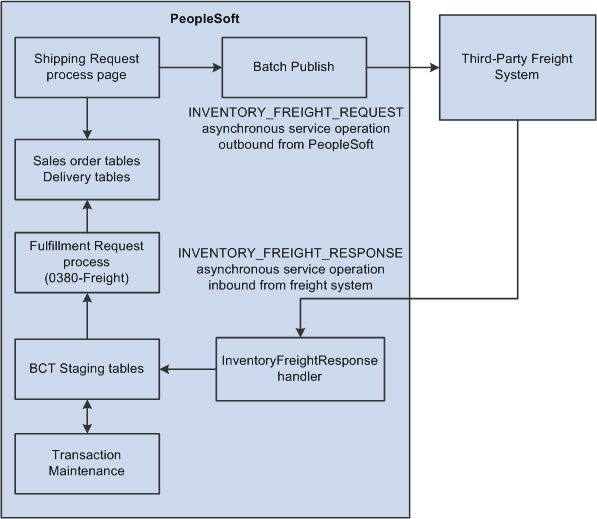
The following diagram illustrates the business process flow of batch freight calculation and manifesting at shipping time.
-
The Shipping Request process page is used to select a large batch of sales orders and move them to the shipped fulfillment state. This process completes several steps and can complete the following freight-specific steps:
-
Assembling the sales order lines into deliveries or validating existing deliveries. The delivery structure that goes out on the freight request transaction is also stored in the PeopleSoft system.
-
An Inventory Freight Request EIP transaction is sent out to the third-party freight provider to request freight rating and manifesting. On the Shipping Request process page, you can request the following freight options: Best Way, Use Specific Carrier, or Carrier with Best Way. The Rate Shopping freight option is only available from an online interactive page, not a process page or EIP.
-
-
The Batch Publisher process publishes the deliveries from the Shipping Request process.
-
Later, the third-party freight system sends an asynchronous rate-results transaction (Inventory_Freight_Response EIP) that provides the resulting freight charges for the delivery IDs associated with the sales order lines. The third-party freight system can also:
-
Add the sales order to the appropriate freight supplier's manifest.
-
Create the appropriate shipping labels for the shipping containers or packages.
-
Assign tracking numbers at the delivery, shipping container, or package level.
-
Generate specialized shipping documents, such as bill of ladings and export documentations.
-
-
The PeopleSoft Integration Broker receives the inbound XML message into the INVENTORY_FREIGHT_RESPONSE queue. The InventoryFreightResponse handler, a PeopleTools application class, formats the incoming data and populates the BCT staging tables. For each transaction request, the InventoryFreightResponse handler assigns a unique ID called the EIP_CTL_ID.
-
The Fulfillment Requests process (IN_FUL_BCT) using the 0380 transaction code (Freight) retrieves the transaction requests from the staging tables, processes them, and applies them to the PeopleSoft production tables. The deliveries for the sales orders are updated with the appropriate carrier, freight charges, tracking numbers, and label URL references. As freight rates are returned they are maintained at the order, delivery, package, and shipping container level. The tracking numbers are assigned to the delivery, packages, or shipping containers in the PeopleSoft system. Once the rate-results transaction has been processed in the PeopleSoft system, for the impacted delivery IDs, then the Manifest Status field on the IN_DELIVERY table is changed to Manifest Received.
-
If the transaction requests are not processed successfully, they are given an error status, and the appropriate error message is provided. The Maintain Transactions component enables you to view and correct requests that contain errors. Once corrected, you can relaunch the Fulfillment Requests process. This is an optional step, you can choose to have the request errors canceled automatically, and then you could create another request.
-
The appropriate shipping documents are printed from the PeopleSoft system. Note that documents generated in the third-party system are printed from the third-party system.
-
The sales orders are depleted, invoiced, and costed in the PeopleSoft system.
-
When the carrier arrives, the shipping manifest in the third-party freight system is provided to the driver along with any other shipping documents.