Setting Up Vertex on a Microsoft Windows NT or Windows 2000 Platform
Vertex provides a registry file to populate entries in the Microsoft Windows NT or Windows 2000 registry. A typical file contains the following entries:
This example illustrates the fields and controls on the Vertex registry file. You can find definitions for the fields and controls later on this page.
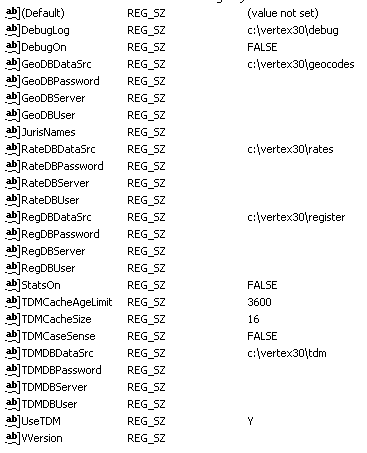
For a Vertex ISAM database, provide values for xxxDBDataSrc. The value would be the directory containing the Vertex database. For relational database connection, the typical setup is to provide values for xxxDBServer, xxxDBPassword, and xxxDBUser, as follows:
RateDBDataSrc=
RateDBServer=qsu
RateDBPassword=solaris25
RateDBUser=solaris25
GeoDBDataSrc=
GeoDBServer=qsu
GeoDBUser=solaris25
GeoDBPassword=solaris25
RegDBDataSrc=
RegDBServer=qsu
RegDBUser=solaris25
RegDBPassword=solaris25
TDMDataSrc=
TDMDBServer=qsu
TDMDBUser=solaris25
TDMDBPassword=solaris25
There should be no blanks between the equal sign and the parameter entered.
See the Vertex Softlink documentation for additional information.