10.3.5 Activating Queue Definitions
Understanding Queue Definition Activation
The following queue definitions must be active for PeopleSoft Pay/Bill Management:
ACTION_REASON
ACTUAL_TIME
COMPETENCY
CUSTOMER
ELAPSED_TIME
ENTERPRISE_SETUP
ESTIMATED_TIME
FO_APP_HIRE
FO_ASSIGNMENTS
FO_MASS_CHANGES
FO_SETUP
FO_SYNC
GL_SETUP
HR_SETUP
MARKET_RATES
MARKET_RATE_LOAD
PAYGROUP_SETUP
PERSON_DATA
PERSON_SETUP
PROJECTS_SETUP
RATING_MODEL
TIME_AND_LABOR_SETUP
Activating Queue Definitions in PeopleSoft FSCM
To activate queue definitions in the PeopleSoft FSCM environment:
-
In your PeopleSoft FSCM 9.2 environment, select PeopleTools, Integration Broker, Integration Setup, Queue Definitions.
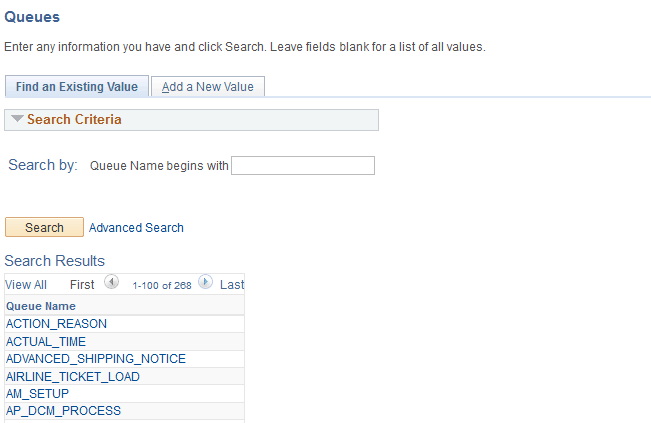
The Queues search page appears, as shown in the following example:
Figure 10-2 Queue Search Page
-
On the Queues search page, search for and select the queue name ACTION_REASON.
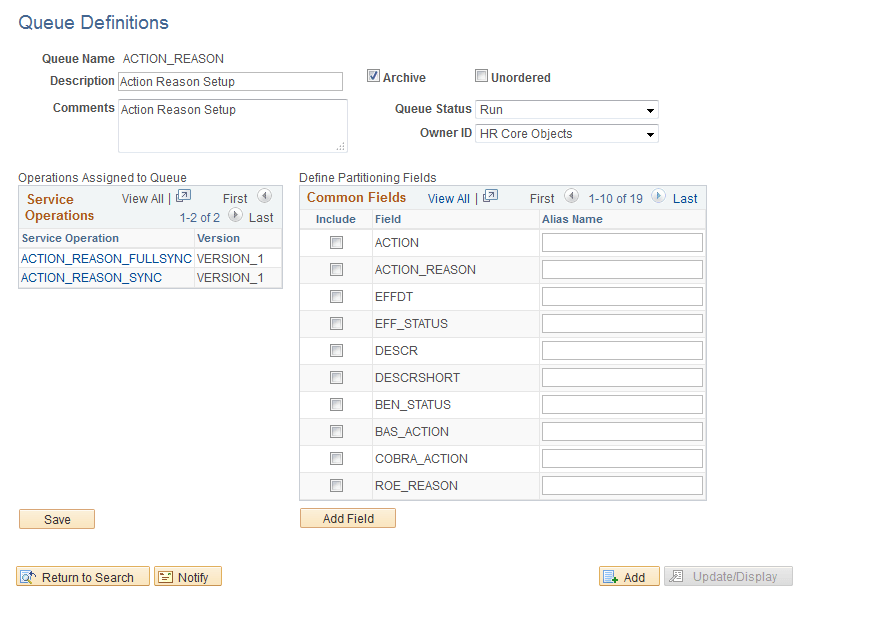
The Queue Definitions page appears, as shown in the following example:
Figure 10-3 Queue Definitions page
-
On the Queue Definitions page, in the Queue Status field, select Run from the drop-down list box.
-
Click Save.
-
Repeat the steps above for the remaining Queues listed in the beginning of this task.
Activating Queue Definitions in PeopleSoft HCM
To activate queue definitions in the PeopleSoft HCM environment:
-
In your PeopleSoft HCM 9.2 environment, select PeopleTools, Integration Broker, Integration Setup, Queue Definitions.
-
On the Queues search page, search for and select the queue name ACTION_REASON.
-
On the Queue Definitions page, in the Queue Status field, select Run from the drop-down list box.
-
Click Save.
-
Repeat the steps above for the remaining Queues listed in the beginning of this task.